
Microsoft Designer
#105 in Image Generators
« AI-generated marketing graphics for professional, commercial-quality visual messages. »
Similar AI Tools
 Deevid AI Image
  ChatGPT Image 2.5
  Nano Banana 2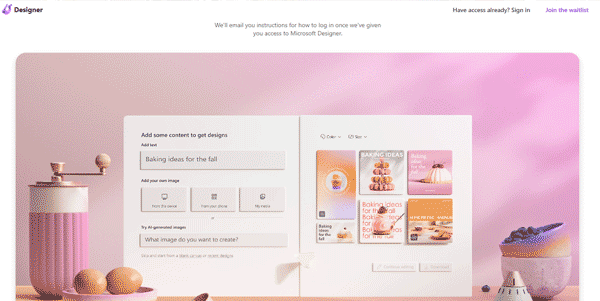


Updated on September 15, 2026
Microsoft Designer is an AI-powered graphic design tool that generates social media posts, invitations, flyers and images from a short written description. No design background required, a Microsoft account is enough to start. The free tier includes 15 AI credits per month, and Microsoft 365 subscribers get a larger allowance shared with Copilot. It runs in the browser, on Windows 11 and on mobile.
Microsoft Designer turns a short prompt, say a banner for a yard sale or an Instagram post for a coffee shop, into a batch of ready-made layouts. You type the sentence, the tool lines up several options with headlines, colors and composition, and you fine-tune everything in a drag-and-drop editor.
Image generation runs on OpenAI's DALL-E models, the same engine family behind today's leading text-to-image models. On the editing side, background removal, object erase and restyling take seconds, with each AI action costing one credit (keep a couple in reserve for the end of the month, they disappear faster than you expect).
Designer is aimed first at non-designers already living inside the Microsoft ecosystem. Projects sync to OneDrive and generated images drop straight into Word or PowerPoint without any export dance. Real-time co-editing is still missing, so sharing goes through the cloud. Here is who gets the most out of it in practice.
| Profile | What Designer brings |
|---|---|
| Small business owner | Posts, banners and ads without hiring a designer |
| Marketing team | One message adapted to every social media format |
| Teacher or nonprofit | Flyers, posters and invitations built from a template |
| Microsoft 365 subscriber | AI credits pooled with Copilot across Word, Excel and Paint |
The free account includes 15 AI credits per month, while the classic editor and templates stay usable without any meter. A Microsoft 365 Personal subscription at $9.99 per month raises the pool to 60 monthly credits, also spendable in Word, Excel, Photos and Paint. Family sits at $12.99 and Premium at $19.99, the latter having absorbed the former Copilot Pro with much higher caps. Microsoft reshuffles these allowances from time to time, so check the official page before committing to a plan.
Yes, Microsoft Designer is free with a Microsoft account. The no-subscription tier includes 15 AI credits per month for generating or retouching images, and the editor plus templates stay open with no counter. Microsoft 365 subscribers receive 60 monthly credits, pooled with Copilot across the Office apps.
Canva has the bigger template library and stronger team features, while Designer counters with free AI image generation and deep Microsoft 365 integration. If your day already happens in Word, PowerPoint and OneDrive, Designer slots into that routine and costs nothing to try.
Commercial use of text-prompted images is allowed under Microsoft's terms, provided you follow the Terms of Use and avoid infringing trademarks or copyrighted material. Those rules have shifted before, so a quick read of the official terms remains wise ahead of any large ad campaign.
Yes. Designer handles AI photo editing such as background removal, object erase, auto-crop and restyling, alongside its generation and layout tools. These features target quick fixes for social posts and marketing material rather than deep professional retouching, which stays the territory of full photo suites.
Verdict: Lighter on templates than Canva, Designer answers back with free image generation and a direct line into Word, PowerPoint and OneDrive; small businesses, nonprofits and Microsoft 365 regulars will knock out their posts and flyers in minutes.

« An all-in-one creative platform that brings together more than 30 image and video models in a single interface. It includes camera controls that let you direct like a real filmmaker, characters that remain consistent from scene to scene, and ready-to-use tools for ads and short-form content »



