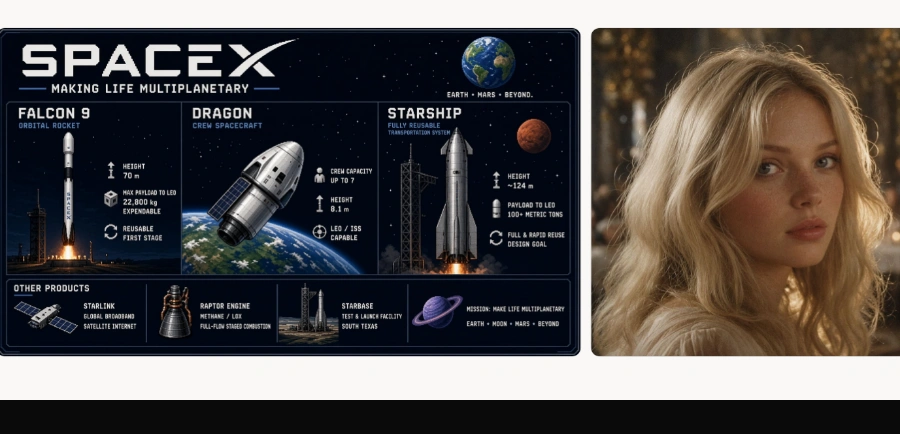
« An image generator that precisely edits a specific area without affecting the rest, featuring background removal, smart resizing, and crisp text rendering for professional-quality illustrations. Created by SpaceXAI and also available on mobile
»
Imagine Image 2.0: edit one region of a picture while the rest stays put
Updated on August 10, 2026
Imagine Image 2.0 is xAI's image generation and editing model, live as the Quality Mode on grok.com/imagine and in the Grok apps for iOS and Android. At launch it held second place worldwide on both Arena leaderboards, behind OpenAI's GPT Image 2. You point at a region, describe the change, and everything else in the frame stays untouched. Free generation inside Grok is now heavily capped, so a paid plan is the realistic path for regular work.
Pros
Edits one region without regenerating the frame
Small, dense text stays sharp and readable
Up to five reference images per generation
Built-in background removal with transparency
Smart resize recomposes across nine aspect ratios
Cons
API still pending, no official date
Quality Mode often gated behind a paid plan
Multilingual text trails GPT Image 2
Magic wand, segmentation, background removal: the Imagine Image 2.0 toolkit
The magic wand in Imagine Image 2.0 changes only the region you point at and leaves the rest of the canvas alone. Image segmentation picks out precise areas to modify, and background removal exports any subject with clean transparency, ready to drop into other software.
Here is what that looks like in practice: you generate a poster, one letter comes out wrong (the misspelled headline, a timeless classic), so you circle the word, type the fix, and the background does not shift by a pixel. Multi-reference editing goes further, blending up to five source images in a single generation.
Tool
What it does
What it replaces
Magic wand
Changes only the pointed region
Regenerating the whole image
Segmentation
Selects a precise area to edit
Rough manual cut-outs
Background removal
Exports the subject on transparency
A separate editing app
Smart resize
Recomposes across nine aspect ratios
Crops that chop off the subject
Multi-reference
Blends up to five source images
Compositing by hand
Hands-on tests of Imagine Image 2.0 after launch
Second on the Arena boards, now flying the SpaceXAI flag
At launch, Imagine Image 2.0 sat second worldwide on both Arena leaderboards, scoring 1,439 Elo in image editing against 1,463 for GPT Image 2. One detail raised eyebrows: the model is listed there under the SpaceXAI name, a consequence of xAI moving under the SpaceX umbrella. Same team, new banner.
An early independent head-to-head published after launch put it ahead on photorealism and character consistency, and behind GPT Image 2 on multilingual text and style transfer. Ready-made templates of this kind exist across other AI image editing tools, but keeping a character identical from one generation to the next is still uncommon.
Product shots and color swaps for e-commerce
Professional headshots from a single photo
Icons, emojis and game sprites
Dense posters with legible small text
Where to try Imagine Image 2.0 and what it costs
Imagine Image 2.0 runs from grok.com/imagine or the Grok app once you pick Quality Mode. Opening an account costs nothing, but generation without a subscription is tightly capped, and Quality Mode frequently redirects to a paid plan.
That leaves the developer side of the wallet question. xAI says API access is on the way, with no date or official rates yet. Meanwhile, third-party platforms such as fal bill the Quality tier per image, around $0.05 at 1K and $0.07 at 2K. Those figures shift quickly, so check xAI's official pages before spending anything.
Partly. Anyone can open Quality Mode in Grok on the web, iOS and Android, but generation without a subscription is heavily restricted and often ends at an upgrade prompt. A paid Grok plan lifts those caps, while the API has not opened yet.
Imagine Image 2.0 vs GPT Image 2: which is better?
GPT Image 2 still tops both Arena leaderboards, with Imagine Image 2.0 right behind in generation and editing. An independent comparison run after launch found xAI's model ahead on photorealism and character consistency, with GPT Image 2 winning on multilingual text and style transfer. The gap between the two is small.
Is there an API for Imagine Image 2.0?
Not officially yet. xAI lists API access as coming soon, without a date or published pricing. A preview version already circulates on third-party gateways such as Vercel AI Gateway and fal, billed per generated image. For production work, waiting for the official release and its final terms is the safer bet.
Does Imagine Image 2.0 also generate video?
No, this model handles still image generation and editing only. Video runs through Grok Imagine's separate video models, which carry their own version numbers. The confusion comes from naming: people searching for Grok Imagine 2 often mean the video side, while Imagine Image 2.0 is xAI's image model.
Verdict: A botched letter on a poster no longer means starting over: designers on deadline, online sellers and marketing teams will claw back hours of retouching, and developers can keep an eye on the API opening to wire it into their own products.
To provide the best experiences, we use technologies such as cookies to store and/or access device information. Consenting to these technologies will allow us to process data such as browsing behavior or unique IDs on this site. Failure to consent or withdrawal of consent may adversely affect certain features and functions.
Functional
Always active
Storage or technical access is strictly necessary for the legitimate purpose of enabling the use of a specific service explicitly requested by the subscriber or Internet user, or for the sole purpose of transmitting a communication over an electronic communications network.
Preferences
Storage or technical access is necessary for the legitimate purpose of storing preferences that are not requested by the subscriber or person using the service.
Statistics
Storage or technical access used exclusively for statistical purposes.Storage or technical access which is used exclusively for anonymous statistical purposes. In the absence of a subpoena, voluntary compliance by your Internet service provider or additional third-party records, information stored or retrieved for this sole purpose generally cannot be used to identify you.
Marketing
Storage or technical access is necessary to create profiles of Internet users in order to send advertisements, or to track the Internet user on a website or on several websites with similar marketing purposes.
To provide the best experiences, we use technologies such as cookies to store and/or access device information. Consenting to these technologies will allow us to process data such as browsing behavior or unique IDs on this site. Failure to consent or withdrawal of consent may adversely affect certain features and functions.
Functional
Always active
Storage or technical access is strictly necessary for the legitimate purpose of enabling the use of a specific service explicitly requested by the subscriber or Internet user, or for the sole purpose of transmitting a communication over an electronic communications network.
Preferences
Storage or technical access is necessary for the legitimate purpose of storing preferences that are not requested by the subscriber or person using the service.
Statistics
Storage or technical access used exclusively for statistical purposes.Storage or technical access which is used exclusively for anonymous statistical purposes. In the absence of a subpoena, voluntary compliance by your Internet service provider or additional third-party records, information stored or retrieved for this sole purpose generally cannot be used to identify you.
Marketing
Storage or technical access is necessary to create profiles of Internet users in order to send advertisements, or to track the Internet user on a website or on several websites with similar marketing purposes.