


Vidnoz AI Review 2025: Create Professional Videos Without a Camera
Vidnoz might just be the reason you finally stop fearing the camera lens. We all know the struggle of recording a simple video message. The lighting is bad, you stumble over words, and you look tired. After the tenth take, you just want to give up.
We have been there too. But what if you could create a professional video without ever showing your actual face? What if a digital twin could speak 140 languages while you sip coffee in your pajamas?
This is exactly what we tested this week. We spent days playing with this platform to see if it lives up to the hype in 2025. Is it just another gimmick, or is it a real asset for your business?
Here is our deep dive into the suite that claims to make video creation accessible to everyone.
➥ What Is Vidnoz AI?
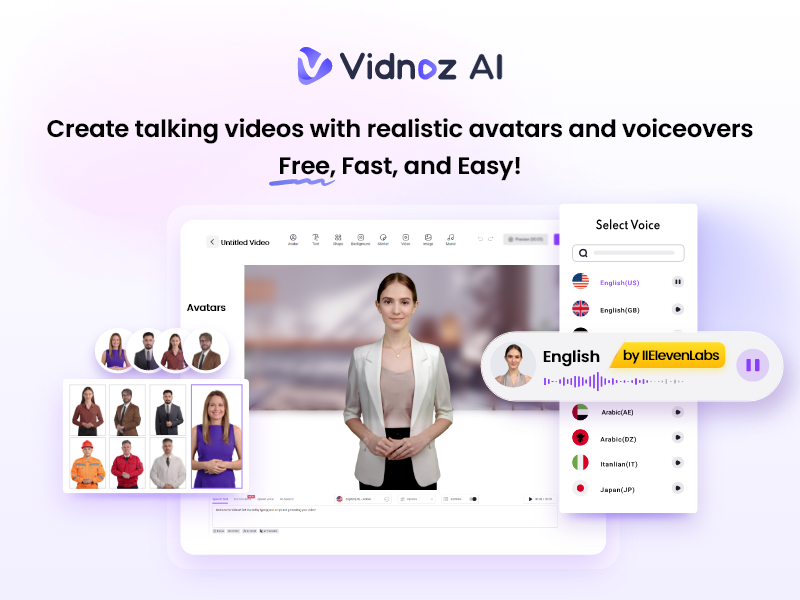
Vidnoz is an all-in-one video creation platform powered by artificial intelligence. It specializes in generating realistic videos from text by using digital avatars.
Turn Text into Realistic Avatar Videos
You can see it as a virtual production studio. Its simple: you provide the script, and the tool provides the actor, the voice, the studio set, and the camera crew. You do not require expensive equipment. You do not even require a microphone.
A Virtual Video Production Studio
The platform actually splits into two main areas. First, there is Vidnoz AI, the generator where the magic happens. Second, there is Vidnoz Flex, a video hosting and recording tool for sales teams.
However, the real star is the AI generator. It has grown massively popular because it has a generous free plan. Most competitors lock everything behind a paywall immediately. This tool takes a different approach and lets you test the waters first.
Quality Improvements
We noticed a huge leap in quality with their recent updates. The lip-syncing is tighter, and the voices sound less robotic. It feels like a mature product now.
➥ Main Features and Use Cases
We explored every corner of the dashboard. The sheer number of tools available is overwhelming at first. So, what stands out the most?
1. Realistic AI Avatars
This is the main feature. You choose a presenter from a library of over 1,200 characters. They have avatars for everything: a doctor in a white coat, a casual tech blogger, or a corporate executive.
We tested this by selecting a casual avatar for a social media clip. The movements were surprisingly fluid. The avatar blinks, nods, and uses hand gestures that match the rhythm of the speech. It is not perfect, but it is very convincing.
2. Voice Cloning and Text-to-Speech
The audio engine is impressive. You have access to over 1,240 voices across 140+ languages. But the real fun begins with voice cloning.
We recorded a 2-minute sample of our own voice. The system processed it quickly, and the result was scary good. You can type any text, and the AI speaks it in your voice. This is huge for maintaining brand consistency without recording every single update yourself.
3. Vidnoz Face Swap
This feature is a bit more playful but incredibly viral. You can swap faces in photos or videos. Marketers use this to create memes or personalized content. We tried swapping our face onto a superhero body. The blending was seamless, as it detects lighting and angles better than most mobile apps we have tried.
4. AI Dance Generator
This is a new addition for 2025. You upload a static photo, and the AI animates it to dance to a specific beat. It sounds silly, but for TikTok or Instagram Reels, it is gold. It grabs attention immediately. We watched a static photo of a team member break into a hip-hop routine. It was hilarious and definitely scroll-stopping.
5. AI Video Wizard
Writer’s block is real. This feature helps you overcome it. You simply type a topic, like “Benefits of Yoga,” and the Wizard generates a full script. It also selects scenes, images, and an avatar for you. You get a rough draft video in minutes. You can then edit it, but the heavy lifting is done.
➥ Concrete Use Cases
Who actually uses this? We identified several key scenarios during our testing.
- Internal Training: HR departments can create onboarding videos quickly. If a policy changes, you just edit the text. No re-shooting the whole video is required.
- Global Sales: You can take a video in English and translate it into Spanish, German, or Japanese. The AI handles the dubbing and lip-sync.
- Customer Support: Instead of a boring FAQ page, you can have an avatar explain solutions. It feels more personal and engaging.
- Faceless YouTube Channels: Creators can pump out news or educational content daily without ever appearing on camera.
Watch “Vidnoz” in action
➥ How to Use Vidnoz AI?
The interface is drag-and-drop. It feels very similar to Canva. If you can make a slide deck, you can make a video here.
Step 1: Choose Your Format
Log in and select a template. You can choose landscape (16:9) for YouTube or portrait (9:16) for TikTok. There are thousands of pre-made templates for different industries.
Step 2: Select an Avatar
Pick a character that fits your brand. You can filter by age, ethnicity, and attire. If you want, you can even upload a photo of yourself to create a “Talking Photo.”
Step 3: Input Your Script
Paste your text into the speech box. You can add pauses or adjust the speed. Select the voice language and accent. We recommend previewing the audio here to ensure pronunciations are correct.
Step 4: Customize Visuals
Add text overlays, images, or videos to the background. You can upload your own assets or use their stock library. The timeline at the bottom lets you sync elements with the speech.
Step 5: Generate
Press the “Generate” button. The cloud servers render the video. It usually takes a few minutes depending on the length. You will get an email when it is ready.
➥ Advantages and Benefits
After a week of heavy usage, we found some clear benefits and a few drawbacks.
Pros
- Free Daily Usage: You get free credits every single day. This is rare in the AI space.
- Huge Asset Library: The selection of avatars and voices is massive compared to rivals.
- Ease of Use: The learning curve is non-existent. It is built for non-editors.
- Fast Rendering: Videos process quickly, usually under 5 minutes for short clips.
- Cost Effective: It saves thousands on actors, studios, and cameras.
Cons
- Watermark: The free plan puts a watermark on your videos.
- Robotic Gestures: Sometimes the hand movements repeat too often.
- Credit Limits: Heavy usage will burn through credits fast on lower tiers.
- Voice Emotion: It can be hard to get the AI to sound truly angry or excited.
➥ Pricing Model
Vidnoz operates on a Freemium model. This is great for testing.
The Free Plan:
You get limited minutes per day (usually 3 minutes). The videos have a watermark and are 720p resolution. It is perfect for trying the tool out.
Starter Plan:
This removes the watermark and unlocks 1080p resolution. You get more minutes per month and access to premium avatars. It is priced accessibly for individuals.
Business Plan:
Designed for teams. You get significantly more minutes, priority processing, and voice cloning features. This is the sweet spot for agencies.
Enterprise:
Custom pricing for large organizations that require API access and unlimited usage.
➥ Who is Vidnoz Best For?
We analyzed the features and pricing to see who benefits the most.
Small Business Owners will love this. You can create ads for Facebook without hiring an agency. It levels the playing field.
Educators and Trainers are another prime group. You can turn boring PDFs into engaging video lectures. Students pay more attention to a speaking face than a text document.
Affiliate Marketers can use this to create product review videos at scale. You can make ten videos in the time it takes to record one manually.
Customer Service Managers can build a video knowledge base. It reduces ticket volume and helps customers help themselves.
➥ Vidnoz Alternatives and Comparison
The AI video space is crowded. How does Vidnoz compare to the big dogs? We looked at the top competitors.
1. HeyGen
HeyGen is the premium choice. The video quality is slightly higher, especially in 4K. Their “Avatar 2.0” looks almost indistinguishable from a real human. However, it is more expensive. Vidnoz provides better value for those on a budget.
2. Synthesia
Synthesia is the corporate standard. It focuses heavily on enterprise security and large-scale teams. It is very polished but feels a bit stiffer. Vidnoz feels more playful with its fun tools like Face Swap.
3. D-ID
D-ID specializes in animating static photos. If you just want to make a historical figure speak from a photo, D-ID is great. But for full video production with scenes and text, Vidnoz is a more complete suite.
Comparison Table
| Feature | Vidnoz AI | HeyGen | Synthesia |
|---|---|---|---|
| Free Plan | Daily Free Credits | 1 Credit (One time) | Very Limited |
| Avatar Count | 1,200+ | 120+ | 160+ |
| Voice Cloning | Yes (Easy) | Yes (Premium) | Yes (Add-on) |
| Viral Tools | Face Swap, AI Dance | No | No |
| Best For | Creatives & SMBs | High-End Production | Corporate Enterprise |
➥ Conclusion and Review
We entered this review skeptical. We left pleasantly surprised. Vidnoz is not just another AI wrapper. It is a robust studio that genuinely saves time.
The quality in 2025 has reached a point where it is usable for professional business contexts. It is no longer just a toy. The combination of video generation, hosting, and viral tools makes it special.
Is it perfect? No. Real humans still have more nuance. But for 90% of business videos (explainers, updates, ads), it is more than good enough. It is excellent.
If you hate being on camera or simply do not have the budget for a film crew, this tool solves your problem instantly. The free daily credits mean you have absolutely zero risk in trying it out.
Go create your first video today. Make your digital twin do the work while you relax.
 Try Vidnoz
 ➥ FAQ: Common Questions About Vidnoz
Is Vidnoz really free to use?
Yes, it has a generous free tier. You get free credits every day to generate short videos. This resets daily, so you can keep using it for small projects without paying.
Can I use the videos for commercial purposes?
If you are on a paid plan, yes. You own the commercial rights to the videos you create. On the free plan, there are some restrictions, and you must keep the watermark.
Does it support my language?
Likely yes. It supports over 140 languages. This includes major languages like Spanish, French, and German, but also niche local dialects.
Can I upload my own photo to make it talk?
Absolutely. The “Talking Photo” feature lets you upload any portrait. The AI will animate the mouth and face to match your script.
How realistic are the custom avatars?
They are very good. If you record high-quality footage for training, the AI twin looks nearly identical to you. It captures your mannerisms and voice tone effectively.
Do I need to download software?
No. It is entirely cloud-based. You access everything through your web browser. This means you can use it on a laptop, tablet, or even a Chromebook.
 More sites like Vidnoz AI in the category: #Avatars
Text written by a human



 Copy Link
« An all-in-one creative platform that brings together more than 30 image and video models in a single interface. It includes camera controls that let you direct like a real filmmaker, characters that remain consistent from scene to scene, and ready-to-use tools for ads and short-form content »
 90
90


