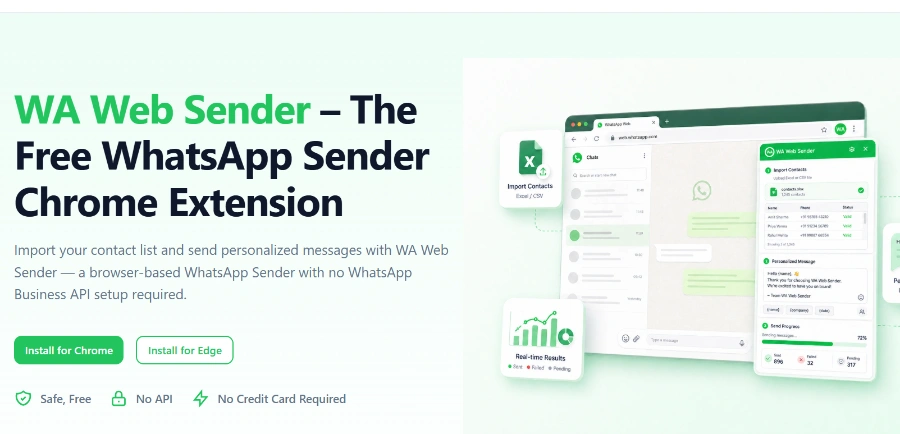
« A service for sending bulk WhatsApp messages from your browser: import your contacts from Excel, customize each message, and manage sending intervals without using the official API. You can customize each message and add files
»
WhatsApp Web Sender: bulk WhatsApp campaigns straight from an Excel file, no API setup
Updated on August 11, 2026
WhatsApp Web Sender is a Chrome and Edge extension that sends personalized bulk WhatsApp messages from WhatsApp Web, based on a contact list imported from Excel or CSV. Over 200,000 installs show up on the Chrome Web Store, along with a 4.8/5 rating. The base plan costs nothing, with no time limit attached. There is no WhatsApp Business API to configure and no code to write.
Pros
Excel or CSV import without saving numbers
Personalized fields (name, company) in every message
Pause, resume and retry failed sends
No WhatsApp Business API configuration
Free plan with no time limit
Cons
Unofficial tool, so volume caution is advised
Browser-only, limited to Chrome and Edge
Best suited to small and mid-sized contact lists
One Excel file, a few custom fields, and the campaign runs inside WhatsApp Web
The process takes three steps: you import your contacts from an Excel or CSV file, you write a message with placeholders such as first name or company, and the extension sends everything from WhatsApp Web without saving numbers one by one. Each recipient gets a message addressed to them, with an optional image, video or document attached.
The best part is the follow-up: a live panel tracks campaign progress while replies land in your regular chats.
Batch size and sending interval controls
Pause and resume at any point
One-step retry for failed messages
Reusable message templates across campaigns
Sending to group members one by one
Result export for later review
WhatsApp Web Sender for sales reps, shops and nonprofits
No WhatsApp Business API to set up: that is what separates WhatsApp Web Sender from platforms such as WATI or AiSensy, which are built on Meta's official API and billed by subscription or per message, a common model among AI marketing platforms. Here everything runs in your browser, on your own account, including a standard WhatsApp Business account.
So who actually relies on it? The publisher lists sales follow-ups after trade shows, promotional campaigns and event invitations; the published testimonials even include a charity coordinating a network of twelve hospitals.
Profile
What the extension saves them
Sales rep
Follow up with each prospect by name after a demo or event
Shop, e-commerce
Tell customers about a sale or restock in one go
Event organizer
Send invitations and schedule changes at once
Nonprofit
Keep members informed and run donation appeals
Getting started with WhatsApp Web Sender without upsetting WhatsApp
Installation goes through the Chrome Web Store or Microsoft Edge Add-ons, under the name WA Bulk Message Sender, the publisher's official extension. Once pinned, its icon shows up directly inside WhatsApp Web. On pricing, the free-forever plan is the headline and no public price grid covers anything beyond it; wawebsender.com is the place to check current terms.
A word of caution before you launch anything big. The tool has no affiliation with WhatsApp Inc., and mass sends of identical texts can trip Meta's anti-spam filter. The publisher itself recommends wider sending intervals and a personal touch in every message, a simple timestamp does the trick. (Many regulars keep a dedicated number for campaigns, which lets the personal one sleep soundly.)
Yes, the publisher provides a free plan with no time limit: Excel contact import, personalized messages with attachments, sending intervals and result tracking are all included. No public price grid is shown for anything beyond that, so the official website remains the reference for current terms.
Can you get banned from WhatsApp for bulk messaging?
The risk is real with any unofficial tool: WhatsApp may restrict an account that sends too many identical messages too fast. To reduce it, set a wide sending interval, personalize every message and stick to contacts who agreed to hear from you.
Does WhatsApp Web Sender work with WhatsApp Business?
It does, as long as the WhatsApp Business account is connected to WhatsApp Web. In that case the publisher advises working from opt-in contact lists and following the platform's business policy for notifications, which keeps campaigns on the right side of the rules.
Does the extension collect your personal data?
According to its Chrome Web Store listing, the developer has disclosed that it will not collect or use your data, and the store reports a clean record with no violations. Your chats stay inside WhatsApp Web; the imported list only serves to prepare sends from your browser.
Verdict: Fifty follow-ups without pasting the same text fifty times: that is the time saved here. Freelancers, small shops and nonprofits already working on WhatsApp will get the most out of it week after week.
To provide the best experiences, we use technologies such as cookies to store and/or access device information. Consenting to these technologies will allow us to process data such as browsing behavior or unique IDs on this site. Failure to consent or withdrawal of consent may adversely affect certain features and functions.
Functional
Always active
Storage or technical access is strictly necessary for the legitimate purpose of enabling the use of a specific service explicitly requested by the subscriber or Internet user, or for the sole purpose of transmitting a communication over an electronic communications network.
Preferences
Storage or technical access is necessary for the legitimate purpose of storing preferences that are not requested by the subscriber or person using the service.
Statistics
Storage or technical access used exclusively for statistical purposes.Storage or technical access which is used exclusively for anonymous statistical purposes. In the absence of a subpoena, voluntary compliance by your Internet service provider or additional third-party records, information stored or retrieved for this sole purpose generally cannot be used to identify you.
Marketing
Storage or technical access is necessary to create profiles of Internet users in order to send advertisements, or to track the Internet user on a website or on several websites with similar marketing purposes.
To provide the best experiences, we use technologies such as cookies to store and/or access device information. Consenting to these technologies will allow us to process data such as browsing behavior or unique IDs on this site. Failure to consent or withdrawal of consent may adversely affect certain features and functions.
Functional
Always active
Storage or technical access is strictly necessary for the legitimate purpose of enabling the use of a specific service explicitly requested by the subscriber or Internet user, or for the sole purpose of transmitting a communication over an electronic communications network.
Preferences
Storage or technical access is necessary for the legitimate purpose of storing preferences that are not requested by the subscriber or person using the service.
Statistics
Storage or technical access used exclusively for statistical purposes.Storage or technical access which is used exclusively for anonymous statistical purposes. In the absence of a subpoena, voluntary compliance by your Internet service provider or additional third-party records, information stored or retrieved for this sole purpose generally cannot be used to identify you.
Marketing
Storage or technical access is necessary to create profiles of Internet users in order to send advertisements, or to track the Internet user on a website or on several websites with similar marketing purposes.



 Adcreative AI by Semrush
  ThumbnailCreator.com
  Social Content AI