Viggle 2.0: one photo swaps any character in any video
Updated on August 11, 2026
Viggle 2.0 is the second generation of Viggle AI, a character animation tool built by Canadian startup WarpEngine: you supply a photo and a reference video, and the character from the photo copies every movement in the clip. Released on April 1, 2024, this version brought sharper output and far more believable facial expressions. The free plan covers 5 videos a day, while paid plans begin at $4.99 per month. Most of its fame came from TikTok, where full-body swap memes made with the tool went viral worldwide.
Pros
Replaces an entire body, not only the face
Over 5,000 ready-made motion templates
Real-time character swap for live streaming
Mobile apps rated 4.9 on the App Store
Cons
Watermark and 720p cap on the free plan
Clips top out around 15 seconds
Very fast dance moves can glitch
How Viggle 2.0 puts anyone inside any footage
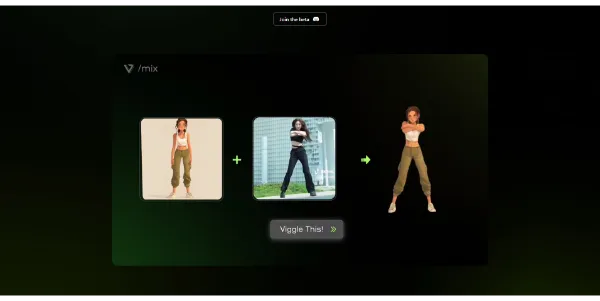
Viggle 2.0 runs on a simple equation: one character image plus one motion video equals an animated clip. You send a photo of your cat in armor, add a TikTok dance clip, and a few minutes later the cat performs the routine, facial expressions included. The approach sits close to face swap generators, with one twist: the whole body gets replaced, head to toe.
Each mode covers a distinct job. Mix drops your image into an existing video, Multi handles several characters at once, Move animates a subject while keeping the original background, Mic syncs lips to an audio recording, and Rap makes any figure perform lyrics. Live goes further by reading your webcam so you can perform as a character in real time on Twitch or YouTube.
Official demo of the Viggle 2.0 upgrade
From viral memes to a physics-trained model
The 2.0 release made JST-1 public, described by its makers as the first video-3D foundation model, trained to grasp how bodies move under real physics. In practice, it works like motion capture without suits or studio gear, extracted from ordinary footage.
Much of the tool's reputation came from social media (the wave of edits replacing rapper Lil Yachty's stage entrance with the Joker and a hundred other figures started here). Since the 2.0 milestone, the engine has been updated several times, with smoother motion at each step.
Viggle pricing: play for free, pay to publish
Viggle pairs a permanent free plan with three subscriptions built on a credit system, where each generation consumes a variable amount depending on the mode. Developers get a separate API, billed at roughly $0.01 per second of rendered video.
One caveat before you subscribe: this grid shifts fairly often, so the official pricing page remains the only reference worth trusting at checkout time.
Yes, Viggle AI includes a permanent free plan: up to 5 videos per day in relaxed mode, each carrying a watermark and capped at 720p resolution. Paid plans starting at $4.99 per month remove the watermark, add monthly credits and speed up generation considerably.
Can Viggle videos be used commercially?
Commercial work calls for a paid plan: free-tier clips are watermarked and cannot be legally monetized. A Pro subscription or higher unlocks business and client usage. Reading the current terms of service is worth the five minutes before building a paid workflow around the tool.
Is Viggle AI safe?
Broadly speaking, yes: the service asks for no sensitive personal data, you upload an image and download a video. The real caution concerns content itself. Avoid animating photos of people without their consent, and steer clear of copyrighted characters if you plan to publish the result.
Does Viggle have a mobile app?
Both iOS and Android apps exist, and the iOS version holds a 4.9-star App Store rating. They include Mix, Multi, Mic and Live modes plus thousands of scene templates. The web version also runs fine in a mobile browser if you prefer skipping the install.
Verdict: Meme makers get a daily playground, streamers get a live costume box, and video editors get a fast previz shortcut before a real shoot. For polished commercial clips, pairing Viggle with a classic editing suite completes the toolkit nicely.
To provide the best experiences, we use technologies such as cookies to store and/or access device information. Consenting to these technologies will allow us to process data such as browsing behavior or unique IDs on this site. Failure to consent or withdrawal of consent may adversely affect certain features and functions.
Functional
Always active
Storage or technical access is strictly necessary for the legitimate purpose of enabling the use of a specific service explicitly requested by the subscriber or Internet user, or for the sole purpose of transmitting a communication over an electronic communications network.
Preferences
Storage or technical access is necessary for the legitimate purpose of storing preferences that are not requested by the subscriber or person using the service.
Statistics
Storage or technical access used exclusively for statistical purposes.Storage or technical access which is used exclusively for anonymous statistical purposes. In the absence of a subpoena, voluntary compliance by your Internet service provider or additional third-party records, information stored or retrieved for this sole purpose generally cannot be used to identify you.
Marketing
Storage or technical access is necessary to create profiles of Internet users in order to send advertisements, or to track the Internet user on a website or on several websites with similar marketing purposes.
To provide the best experiences, we use technologies such as cookies to store and/or access device information. Consenting to these technologies will allow us to process data such as browsing behavior or unique IDs on this site. Failure to consent or withdrawal of consent may adversely affect certain features and functions.
Functional
Always active
Storage or technical access is strictly necessary for the legitimate purpose of enabling the use of a specific service explicitly requested by the subscriber or Internet user, or for the sole purpose of transmitting a communication over an electronic communications network.
Preferences
Storage or technical access is necessary for the legitimate purpose of storing preferences that are not requested by the subscriber or person using the service.
Statistics
Storage or technical access used exclusively for statistical purposes.Storage or technical access which is used exclusively for anonymous statistical purposes. In the absence of a subpoena, voluntary compliance by your Internet service provider or additional third-party records, information stored or retrieved for this sole purpose generally cannot be used to identify you.
Marketing
Storage or technical access is necessary to create profiles of Internet users in order to send advertisements, or to track the Internet user on a website or on several websites with similar marketing purposes.



 Deevid AI
  Kling 3.0
  MiniMax H3