Raspberry Pi AI Camera
#35 in Robots and Devices
« A compact, affordable smart camera for your AI projects. Capture high-resolution images, perform object recognition and video processing in real time »
Similar AI Tools
 Chessnut
  Tesla Optimus
  NEO by 1x Technologies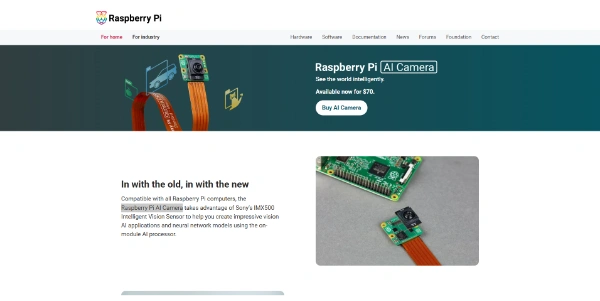


Updated on August 11, 2026
The Raspberry Pi AI Camera is an official camera module from Raspberry Pi: its Sony IMX500 sensor runs neural networks directly on the chip, behind a 12.3-megapixel imager. It sells for $70 through the usual resellers. Any Pi with a CSI camera connector can drive it, including the tiny Zero. Detection and pose estimation models come preloaded, so the first demo runs minutes after unboxing.
The Sony IMX500 sensor carries its own neural network accelerator with 8 MB of dedicated memory: object detection, pose estimation and segmentation all run inside the camera, which returns frames already tagged with tensor metadata. The preloaded MobileNet-SSD model runs at roughly 30 frames per second in 1080p, and the rate is identical on a Pi Zero and a Pi 5.
Point the lens at your desk, a mug enters the frame, a labelled box pops up within a second. Meanwhile the Pi's processor stays available for the rest of your code, a real gain for embedded computer vision. The in-house libraries, libcamera, Picamera2 and rpicam-apps, handle it natively.
Raspberry Pi sells three inference accessories, and the AI Camera is the only one compatible with the whole lineup. The Hailo-based boards accept heavier models but require a Pi 5 plus a separate camera.
On battery-powered builds, a sensor that computes on its own trims the energy bill considerably. That argument lands well with fans of AI-driven devices and robots, from trail cameras to people counters.
| Accessory | AI compute | Compatibility |
|---|---|---|
| AI Camera | IMX500 built into the sensor | Every Pi with a CSI connector |
| AI Kit | Hailo-8L, 13 TOPS | Raspberry Pi 5 only |
| AI HAT+ 26 TOPS | Hailo-8, 26 TOPS | Raspberry Pi 5 only |
Setup comes down to a ribbon cable and a few terminal lines: plug the camera into the CSI connector, install the imx500-all package, then rpicam-hello starts the first detection demo (the initial model upload to the sensor takes about a minute, roughly one short espresso, after which everything is fast). Your own TensorFlow or PyTorch models convert through Sony's AITRIOS tooling.
On pricing, the camera launched at $70, while the AI HAT+ boards range from $70 to $110 depending on compute. Reseller tags drift over time, so check the official product page before ordering.
The AI Camera computes inside its IMX500 sensor and works on every Raspberry Pi with a camera connector, while the AI Kit and AI HAT+ rely on Hailo chips rated at 13 or 26 TOPS, restricted to the Pi 5 and requiring a separate camera. One route favors raw compute, the other simplicity and low power draw.
Yes, provided you convert them with Sony's AITRIOS tools, IMX500 Converter and IMX500 Package, from TensorFlow or PyTorch. The sensor's dedicated memory caps at 8 MB, so only light, quantized models fit, which covers detection and classification but rules out large architectures.
Not with the bundled models, which recognize common objects, people and poses. Plate reading would call for a custom-trained model converted for the IMX500, or extra processing on the Pi itself. The question comes up regularly on forums, and the answer has not changed.
No, focus is adjusted by hand, unlike the Camera Module 3 and its autofocus. The module also doubles as a regular camera, capturing stills up to 4056 x 3040 pixels, handy when you want a full-resolution image alongside the detections.
Verdict: For counting birds at a feeder, watching a 3D printer or spotting a fall, this module does the job with no accelerator and no cloud: makers, teachers and prototyping teams get the simplest vision building block in the Raspberry Pi catalogue.

« An all-in-one creative platform that brings together more than 30 image and video models in a single interface. It includes camera controls that let you direct like a real filmmaker, characters that remain consistent from scene to scene, and ready-to-use tools for ads and short-form content »