

- Seamless switching between top-tier models (GPT-5.2, Gemini 3 Pro, Claude 4.5)
- Deep Research mode generates fully cited, structured reports
- Real-time indexing eliminates knowledge cutoffs
- Enterprise search integrates internal company data effectively
- Full model flexibility and Deep Research are locked behind Pro subscription
- Requires manual verification of sources despite high accuracy
- Workflow requires some ‘finesse’ to master compared to basic search
Perplexity AI: The Answer Engine That Replaces Google? (Tested)
You know that feeling when you ask a search engine a simple question, and it throws 15 blue links, three ads, and a cookie banner in your face? Yeah, we hate that too. That’s why Perplexity AI has become the darling of the tech world. It stopped playing the “fetch” game and started actually doing the homework for you.
We put this “Answer Engine” through the wringer over the past month. We threw everything at it, from debugging obscure Python code to researching the socio-economic impact of 17th-century tulip mania. Spoiler alert: it’s not just a Google wrapper anymore. As a result, it might just make you close your other tabs for good.
➥ What is Perplexity AI?
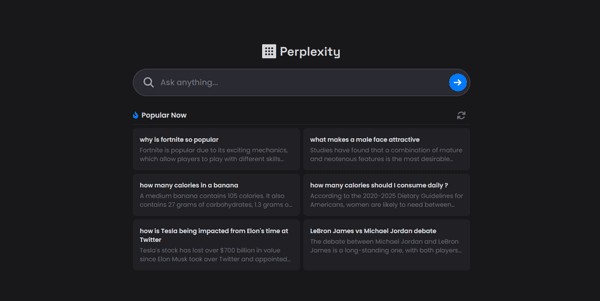
Perplexity AI is what happens when a search engine and a super-smart librarian have a baby. Instead of giving you a list of websites, it reads the internet for you. Then it writes a concise, accurate answer with citations. In short, it’s an “Answer Engine,” not a search engine.
Perplexity operates on a “dual-layer” system. First, it uses its own proprietary Sonar models (built on the Llama 3.1 architecture) to scan the web in real-time. For the heavy lifting, however, you can switch to the big names: GPT-5.2, Claude 4.5 Sonnet, or Gemini 3 Pro.
It’s like having a team of experts in your pocket. You ask a question. Perplexity consults the entire web, filters out the junk, and hands you a summarized report. No scrolling required.
➥ Main Features That Make It Shine

1. Pro Search & Deep Research
The standard search is fast, but Pro Search is where the magic happens. It doesn’t just answer; it asks clarifying questions first. If you ask “best laptops for coding,” it will ask “What’s your budget?” and “Do you prefer Mac or PC?” before responding.
Meanwhile, the Deep Research mode takes things further. This isn’t just a summary; it’s a full-blown report generator. We asked it to analyze EV market trends, and it produced a structured, three-page document with sections, data tables, and over 40 distinct citations. For analysts, it’s a cheat code.
2. The “Avengers” of AI Models
Why commit to one AI model when you can test them all? Perplexity is model-agnostic. With a Pro subscription, you can toggle between the absolute best models on the market:
- Sonar Reasoning Pro: Perplexity’s own model, optimized for live web search and fact-checking.
- GPT-5.2 (OpenAI): The beast for reasoning and creativity.
- Claude 4.5 Sonnet (Anthropic): The king of coding and nuance.
- Gemini 3 Pro (Google): The multimodal master with a massive context window.
Have you ever wished you could switch AI brains mid-task? Now you can.
3. Internal Knowledge Search (Enterprise)
For businesses, Perplexity has solved the “where is that file?” nightmare. The Enterprise Pro plan lets you index your company’s internal documents (Notion, Google Drive, SharePoint). You can ask, “What is our Q4 marketing strategy?” and it will synthesize an answer from your internal PDFs combined with external market data. Honestly, it’s scary good.
4. Spaces and Visual Tools
Collaboration is huge this year. Spaces allow you to create shared collections of search threads. You can invite your team to a “Project Alpha” space. Everyone can see the research, add files, and iterate on the findings together. On top of that, with integrated models like Flux, Seedream and Nano Banana, you can generate charts and images right next to your text.
➥ How to Use Perplexity Like a Pro
Getting started is ridiculously easy, but mastering it takes a little finesse. Here is our recommended workflow:
- Start with a Question: Type it in natural language. Don’t keyword stuff. “How do I fix error 404 on a WordPress site using Nginx?” works better than “WordPress Nginx 404 fix.”
- Let It Clarify: If Pro Search is on, answer the follow-up questions. This narrows down the context significantly.
- Check the Sources: Every sentence has a little number next to it. That number opens the source in a sidebar. Always verify bold claims!
- Switch Models for Tasks: If you want to write an email based on the research, switch to GPT-5.2 for better flair. If you want code snippets, switch to Claude 4.5.
- Create a Page: Found something amazing? Turn that search thread into a shareable, beautifully formatted “Page” with one tap.
➥ Why You Should (or Shouldn’t) Use It
Nothing is perfect. Here is the honest breakdown of our experience.
The Good Stuff (Pros)
- Citations are King: Hallucinations are rare because everything is grounded in search results. You can trust (but verify) the data.
- Model Flexibility: You don’t require separate subscriptions for ChatGPT, Claude, and Gemini. You get them all in one interface.
- Ad-Free Experience: The interface is clean. No sponsored posts masquerading as answers.
- Real-Time Data: Unlike standard LLMs with knowledge cutoffs, Perplexity knows what happened five minutes ago.
The Not-So-Good Stuff (Cons)
- Creativity Limit: It’s a researcher, not a poet. If you want a sci-fi story, native ChatGPT is still better.
- Pricey for Power Use: The “Max” tier ($200/month) is steep. That said, the standard Pro plan ($20) is enough for most people.
- Niche Struggles: On extremely obscure topics (like local regulations in a small town), it sometimes circles back to generic info.
➥ Pricing Models
Perplexity kept it simple, though they introduced a high-end tier for the power crowd.
| Plan | Price | Best For | Key Features |
|---|---|---|---|
| Free | $0 | Casual folks | Unlimited Quick searches, 5 Pro searches/day, Standard Sonar model. |
| Pro | $20 / month | Researchers & Pros | 300+ Pro searches/day, Access to GPT-5.2, Claude 4.5, Gemini 3, Unlimited file uploads, $5 API credit. |
| Max | $200 / month | Heavy hitters | Unlimited EVERYTHING. High-speed reasoning, priority support, access to Claude 4.5 Opus. |
| Enterprise | $40 / seat / month | Teams & Biz | SSO, Internal Knowledge Search, SOC2 Security, Data retention policies. |
➥ Who Is This Tool For?
We see three distinct groups who will absolutely love this tool:
- The Deep Diver: Researchers, students, and journalists. If your job involves synthesizing large amounts of web information, Perplexity cuts your work time in half. The “Deep Research” feature was practically made for you.
- The Developer: With the ability to switch to Claude 4.5 and search for real-time documentation updates at the same time, it’s a coding assistant that actually knows about yesterday’s library update.
- The Corporate Team: The Enterprise features help teams stop asking “where is that doc?” and start asking the AI to find it. For any knowledge-based company, it’s a real productivity booster.
➥ Top Alternatives to Perplexity AI
The AI space is crowded. Here is how the competition stacks up.
1. Google Gemini (Integrated Workspace)
Google has finally integrated Gemini 3 Pro deeply into Search and Workspace. If you live in Google Docs and Drive, Gemini’s ability to pull from your emails and files is unmatched. Its multimodal capabilities (video/audio understanding) are slightly ahead. Nevertheless, its pure web search synthesis can still feel cluttered with ads.
2. ChatGPT (OpenAI)
With GPT-5.2, ChatGPT is smarter than ever. Its “Search” feature has improved drastically, now with citations similar to Perplexity. Yet ChatGPT is still a “creator” first and a “searcher” second. If you want to write a novel or code a complex app from scratch, ChatGPT often has the edge.
3. Claude 4.5 (Anthropic)
Claude remains the champion of large context windows and coding. While it has a “browse” feature, it’s not as fast or comprehensive as Perplexity’s index. Use Claude if you must analyze a 500-page PDF or write an entire software module. But stick to Perplexity for finding the facts to put in it.
Feature Comparison Table
| Feature | Perplexity AI | ChatGPT (GPT-5) | Google Gemini 3 |
|---|---|---|---|
| Primary Focus | Research & Search | Creativity & Reasoning | Ecosystem Integration |
| Citations | Excellent & Precise | Good | Varies (often links) |
| Real-Time Data | Native (Sonar) | Via Search Tool | Native (Google Index) |
| Model Choice | Yes (Multiple) | No (OpenAI only) | No (Google only) |
➥ Conclusion: Is It Worth Your Monthly Subscription?
Perplexity AI has matured from a cool demo into an essential utility. Drowning in information? This tool is the filter we desperately needed. It doesn’t just find links; it respects your time by giving you the answer.
If you are tired of fighting SEO-spam on Google or want a research assistant that doesn’t complain about working weekends, this is it. The ability to switch between GPT-5, Claude, and Gemini under one roof is arguably worth the $20/month alone.
Stop searching and start finding. Go give the free version a spin. Just don’t blame us when you can’t go back to blue links!
 Try Perplexity AI
 ➥ Questions Fréquentes (FAQ)
Is Perplexity AI free to use?
Perplexity AI offers a robust free version that allows unlimited Quick Searches using its standard AI model. However, access to advanced features like “Deep Research” and stronger models is limited on the free tier. You must upgrade to Perplexity AI Pro for unlimited use of premium tools.
How does Perplexity AI compare to ChatGPT?
Perplexity AI functions primarily as an answer engine that scans the web in real-time to provide cited facts. In contrast, ChatGPT focuses more on creative writing and conversational fluency without always referencing live sources. Perplexity AI is generally better suited for accurate research and fact-checking tasks.
Is Perplexity AI safe for private data?
Perplexity AI collects standard usage data like IP addresses and search history to improve its services. While it does not offer end-to-end encryption by default, you can disable AI training on your data in the settings. Users should avoid sharing sensitive personal information with Perplexity AI.
How can I use Perplexity AI for academic research?
You can switch Perplexity AI to “Academic” focus mode to restrict searches to published papers and educational resources. This feature ensures that the generated answers cite credible sources suitable for serious inquiry. Perplexity AI also helps summarize long documents to speed up your literature review process.
Can Perplexity AI analyze uploaded files?
Yes, Perplexity AI allows you to upload documents like PDFs, CSVs, and images for instant analysis and summarization. The free version restricts file uploads to a few per day, while the Pro plan offers higher limits. This makes Perplexity AI a powerful tool for extracting data from static files.
What are the main limitations of Perplexity AI?
Perplexity AI may occasionally generate inaccurate responses if the underlying web sources contain false information. It can also struggle with highly interpretative topics where human nuance is required rather than factual data. Consequently, you should always verify the citations provided by Perplexity AI before using them.
 More sites like Perplexity AI in the category: #Search engine
Text written by a human



 Copy Link