NoteGPT
#29 in Education / Studies
« Optimize your learning with this multifunctional AI assistant. Summarize YouTube videos, PDFs, articles, generate mind maps and organize your notes more intelligently »
Similar AI Tools
 Perplexity AI
 Notion AI
 QuillBot


Updated on November 14, 2026
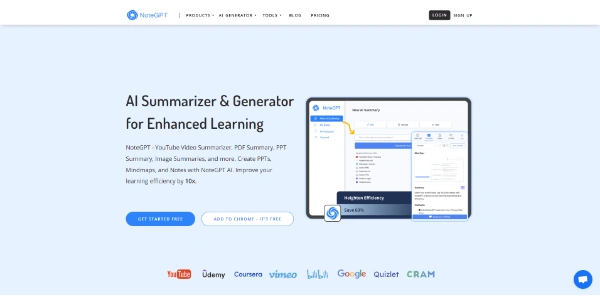
NoteGPT is a freemium AI assistant that condenses YouTube videos, PDFs, audio files and documents into timestamped summaries, mind maps, flashcards and slide decks. Launched in 2023 and led by Hongyuan Cao and Pierre Peng, the platform claims over 80 million sign-ups and a Chrome extension rated 5.0/5 across roughly 8,900 reviews. Paid plans start at $9.99/month (Pro); a free tier exists, capped at 15 quotas per month according to the official help center.
Paste a YouTube URL or upload a PDF, Word file or audio recording. Within seconds NoteGPT returns a timestamped transcript, a chapter-based summary, and the option to generate a mind map or flashcard set with one click. The Chrome extension runs right on the YouTube page, so you never leave the tab.
Only YouTube is supported as a streaming platform (others are planned). Videos without captions can be transcribed up to 2 hours on Pro, 210 minutes on Unlimited and Max. With captions, length is unlimited. Batch mode handles up to 20 videos at once on Max (5 on Pro, 10 on Unlimited).
The chat layer routes tasks across several models (GPT, Claude, Gemini, DeepSeek) and doubles as a writing assistant, slide builder, spreadsheet generator and image/voice/video producer. A deep-research mode delivers reports with cited sources. For anyone who dabbles in automatic summarization, the scope is ambitious, perhaps overly so.
All plans separate basic quotas (summaries, translations, standard-model chat) from premium credits (images, voices, advanced models). The free tier is not listed on the pricing page; the official help center states 15 free quotas per month.
| Plan | Monthly | Annual (per month) | Premium credits / month |
|---|---|---|---|
| Pro | $9.99 | $9 | 100 |
| Unlimited | $29 | $19.92 | 2,800 |
| Max | $99 | $69 | 10,000 |
The Chrome extension is the standout entry point: reliable, fast, and consistently praised. Generating a mind map from a 90-minute lecture takes a single click and usually under a minute. Flashcard export fits neatly into a study workflow before exams.
The interface, however, needs work. Dark mode is hard to read, the chat panel cannot be resized, and some features (audio transcription on the free plan, Quizlet integration) have been flagged as buggy by independent reviewers. The AI Humanizer was flagged as 100% AI by Originality.ai in a test published in December 2025, so treat it as a minor extra rather than a selling point.
Compared to NotebookLM, which is free and provides source-level citations, NoteGPT's edge is caption-free YouTube transcription and automatic mind-map and flashcard generation. Eightify focuses narrowly on YouTube summaries, while ChatPDF zeroes in on document chat. NoteGPT tries to cover all of those angles plus content creation. The official site lists only its Chrome and Edge extensions, with no mobile app, and the smoothest workflow remains the desktop Chrome extension. Pricing may shift over time, so check notegpt.io for the latest figures.
Yes. NoteGPT has a free tier that requires no credit card, capped at 15 quotas per month according to the official help center. Paid plans start at $9.99/month (Pro), with Unlimited at $29 and Max at $99. Annual billing brings the cost down, for example Pro drops to $9/month.
Partly. NoteGPT states that data is encrypted in transit and at rest, and its privacy policy cites GDPR and CCPA. The policy does not say whether content is used for AI training and notes that data may be shared with advertising partners. No ISO 27001 or SOC 2 certification is mentioned, and the publisher discloses no legal entity or address. Refunds are limited to 24 hours after the very first purchase.
Absolutely. The Chrome extension transcribes YouTube videos in seconds, even those without captions (up to 2 hours). Transcripts include timestamps, can be exported as TXT or SRT, and translated into over 40 languages. Paid plans raise the no-caption limit to 210 minutes on Unlimited and Max.
No confirmed official app: notegpt.io lists only its Chrome and Edge extensions. Apps carrying the NoteGPT name exist on the App Store, but they are published by other developers. The Chrome extension remains the strongest experience, with one-click summaries right on the YouTube page.
Verdict: Three hours of recorded lectures condensed into timestamped notes, a mind map and a deck of flashcards before the next class: that is the workflow where NoteGPT delivers the most value. Students and self-learners who process large amounts of YouTube and PDF content will get their money's worth from the Pro plan, while casual users can test the waters at no cost.

« An all-in-one creative platform that brings together more than 30 image and video models in a single interface. It includes camera controls that let you direct like a real filmmaker, characters that remain consistent from scene to scene, and ready-to-use tools for ads and short-form content »