
- Unmatched Blog-to-Video workflow for content repurposing
- Quality of neural voices and voice clones remains top-tier
- Native integration of contextual video generation (Sora/Veo type)
- Immediate setup without a complex timeline
- Not suited to cinematic edits or complex narrative structures
- ‘Digital Twins’ avatars remain one step below specialized leaders
- Risk of a generic look on automated productions
Quick summary: Fliki AI is the fastest route for creators who dislike traditional video editing. The tool converts scripts or blog articles into complete videos (voice, B-roll, subtitles) in record time.
- Best for: “Faceless” content creators (TikTok/Shorts), bloggers, podcasters.
- Less suitable if: the goal is complex, Hollywood-style cinematic editing.
- Key factor: its Blog-to-Video workflow and the strong quality of its neural voices.
Fliki AI: full review of the Blog-to-Video tool and AI voice
Fliki AI is now one of the most popular tools for quickly producing video content. Have you ever given up on a YouTube channel because editing took too much time? Then you’ve come to the right place.
The platform has gone beyond simply assembling stock images. Over time, it has become a true AI-assisted production studio. What’s more, it radically simplifies video creation.
Skip the super-complex software where every transition requires three clicks. Here, text is king. We explored the new version of the tool, particularly with the arrival of “Fliki Pro.”
➥ So, what really is Fliki AI?
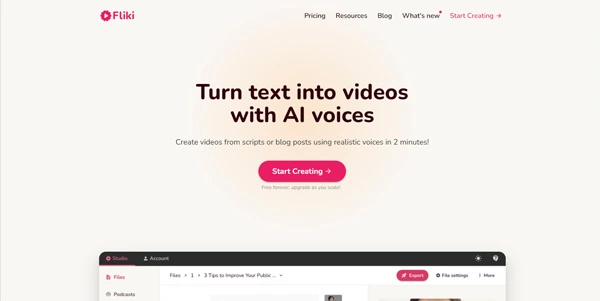
Fliki is a platform that uses generative artificial intelligence to convert text into audio or video files. Unlike a traditional video editor with a timeline, Fliki works more like a word processor.
The principle is simple. You write (or copy and paste) your script, and the AI takes care of the rest. It finds the visuals, generates the voiceover, and automatically adds subtitles.
It’s the perfect tool for the “faceless” format. These types of videos, where you don’t show your face, are hugely popular on TikTok, Instagram Reels, and YouTube Shorts.
A significant change
It’s no longer just a bank of images scrolling by. Thanks to the integration of recent generative video models (such as Sora or Veo), the tool can now create original video shots. At the same time, it retains its historical strength: strikingly realistic voiceovers.
➥ Key features and use cases

Based on our analysis of the latest updates, here’s what makes Fliki so powerful.
1. Intelligent “Text-to-Video”
You enter a sentence. Fliki analyzes it and places a video in the background that matches the context. In practice, this allows you to create a one-minute video in less than 120 seconds.
What has changed: The tool now better understands nuances. If you mention a “melancholic atmosphere in Paris,” it no longer inserts a generic image of the Eiffel Tower. It searches for or generates a shot with the right color scheme and weather conditions.
2. Ultra-realistic neural voices (Voice Cloning)
This is where Fliki often crushes the competition. The quality of the voices is spectacular. They breathe, pause, and can express joy or anger.
Voice cloning has also made a major leap forward. With just a few minutes of audio recording, you can create your own digital voice clone. This suits content creation in your native language (or in Spanish, German, Japanese) without opening your mouth.
3. Blog-to-Video (The Magic Converter)
Here’s a feature that saves SEO specialists and bloggers a ton of time. You paste the URL of your article, and Fliki extracts the key points to create a summary video. It’s perfect for repurposing your written content on LinkedIn or YouTube.
4. AI avatars and “digital twins”
Although HeyGen remains the leader in this segment, Fliki has caught up. You can now use AI avatars to present your videos.
The “Digital Twin” feature allows you to animate your own face from a photo and a voice sample. This is useful for humanizing an explanatory video without having to set up a studio and lighting.
All services available on Fliki.ai
Overview of the full list.
-
AI voiceover
Adds realistic narration in a few clicks, useful for tutorials, ads, and YouTube videos.
View feature
-
Idea to video
You provide a topic, the tool generates a short video ready to publish.
View feature
-
Text to speech (TTS)
Converts text into natural audio for narration, podcasts, or dubbing.
View feature
-
PPT to video
Imports a PowerPoint and turns it into a video with narration and visual styling.
View feature
View more features
-
AI avatar
Creates presenter-style videos without a camera, practical for explainers.
View feature
-
Voice cloning
Recreates a voice from a short sample to speed up production.
View feature
-
Text to video
You write a script or an idea, Fliki builds a video automatically.
View feature
-
Article to video
Repurposes a blog post into a video with simple, efficient editing.
View feature
Image to video
Animates images with transitions, voice, and music to tell a story.
View feature
Product video
Turns a product page into a marketing video to boost attention and conversion.
View feature
Templates
Ready-made layouts to keep visuals clean and consistent.
View feature
Translation
Adapts a video quickly for other languages and audiences.
View feature
AI video generator
From a prompt, the tool assembles scenes, voices, subtitles, and music.
View feature
Script to video
You provide the text, Fliki handles editing and staging.
View feature
Presentation creator
Generates slides quickly for pitches, courses, or client materials.
View feature
Thumbnail creator
Creates eye-catching thumbnails without a design tool.
View feature
Screen recorder
Captures your screen easily for product demos and tutorials.
View feature
Video editor
Cuts, subtitles, and adjustments without constant exporting.
View feature
Video ad generator
Creates ad videos quickly, tailored for social platforms.
View feature
Talking avatar
Makes an avatar speak your text for a facecam-style result without filming.
View feature
AI animation
Adds animated elements to explain or energize an idea.
View feature
YouTube Shorts
Generates fast-paced Shorts designed for vertical viewing.
View feature
ChatGPT to video
Starts from text and converts it into a video with a simple flow.
View feature
Video memes
Creates viral-style formats with templates and subtitles.
View feature
TikTok
Vertical videos ready to post with narration and captions.
View feature
Image animator
Adds motion to a photo or illustration without motion design work.
View feature
Reels generator
Turns a script into an engaging Reel designed for Instagram.
View feature
Movie creator
For a more cinematic result, narration, mood, scenes, and pacing.
View feature
Sales video
Structures a clear commercial message with a polished, branded result.
View feature
Real estate
Turns a listing into a video to attract more prospects.
View feature
Video quiz
Adds questions to drive engagement for training, onboarding, or lead magnets.
View feature
Case study
Tells a client story with data, narrative, and visuals.
View feature
Webinar
Creates or repackages a webinar with a clear, clean result.
View feature
Slideshow video
Assembles photos and clips into a smooth narrative with transitions and music.
View feature
Testimonials
Stages customer feedback in video form to build trust.
View feature
Bulk creation
Generates a series of videos from a spreadsheet to scale production.
View feature
Embed integration
Provides a simple embed code for publishing on your site.
View feature
➥ How to use it? (In 4 easy steps)
It’s incredibly easy to get started. Here’s how a typical session works:
- The script: You start in the “File” tab. You can write your script, ask the built-in AI to write it for you, or import a blog post.
- Voice casting: You select the default voice name (often “Sarah” or “Davis”), then pick another. You can filter by language, dialect, and emotion (e.g., “Whisper”, “Excited”).
- Visual styling: Fliki already preselects images and videos for each sentence. If you do not like an image, you can swap it. The tool then gives you three options: its stock library (millions of assets), an AI image generator (cartoon, cinematic, etc.), or your own uploaded files.
- Export: Once you are happy, you export as MP4. You can pick the aspect ratio (9:16 for TikTok or 16:9 for YouTube) right away.
➥ Benefits and advantages
Why choose Fliki over a freelance editor or software like Premiere Pro?
- Execution speed: What used to take 4 hours now takes 15 minutes. It is purely mathematical.
- Production costs cut drastically: No more voiceover purchases, no more stock image subscriptions (such as Shutterstock), no more editing software. Everything is included.
- Brand consistency: With voice cloning, all your videos keep the same sound identity, even when creation is delegated.
- Accessibility: No technical skills are required. The interface is as simple as a Google Doc.
➥ How much does Fliki.ai cost?
Fliki operates on a credit system (often calculated in minutes of video/audio generated). Here is the current pricing structure:
| Free | Curious testers | 5 minutes of credits per month. Watermark included. Useful to explore the interface, but not suitable for a serious brand. |
| Standard | Beginners | Around $28 per month. Removes the watermark, grants access to millions of stock images and quality voices. Video length remains capped, often 15 minutes. |
| Premium | Professionals and agencies | Around $88 per month. This is the serious plan. It unlocks voice cloning, ultra-realistic voices, high-end AI avatars, and a higher duration limit. |
Note: The credit system can be tricky. One minute of video consumes more credits if you use heavy generative features. Always check your balance before you start.
➥ Who is this tool ideal for?
Fliki is not suitable for everyone. It is specifically designed for certain audiences:
- Solo “Content Creator” solopreneurs: Those who must feed the TikTok and Reels algorithms every day without a team.
- Bloggers and SEOs: To turn older written articles into YouTube videos and capture traffic on a second channel.
- Educators and trainers: To build short course modules with a clear voice, without recording the same content dozens of times.
- Marketing agencies (SMA): To produce ads (UGC-style or explainer videos) for multiple clients in a steady flow.
➥ Alternatives to Fliki AI
If Fliki doesn’t quite convince you, here are some direct competitors that are worth checking out:
InVideo AI
This is the most serious rival. InVideo often allows for more precise control over editing (more traditional timeline). Do you need to make very precise cuts or create complex visual effects? InVideo is often a step above. However, Fliki remains faster for pure “text to video.”
HeyGen
Is your top priority to have an avatar that talks to the camera (Talking Head)? HeyGen remains the undisputed king of lip realism. Fliki offers avatars, but HeyGen has made it their specialty.
Pictory
Very similar to Fliki in its “Blog-to-Video” approach. Pictory excels particularly at cutting long webinars (Zoom) into short clips (Shorts).
➥ Conclusion and Opinion on Fliki AI
After exploring Fliki AI’s capabilities, the verdict is clear. It is the ultimate productivity tool for the “lazy but smart” creator.
It won’t replace a film director for an emotional short film. However, for flooding social media with high-quality, educational content, it’s a formidable weapon.
The quality of the voices remains its major asset. The videos are pleasant to listen to, which is often the weak point of AI-generated content. Are you looking to launch an automated channel or give your texts a second life? Then Fliki is well worth using its free credits to see for yourself.
And you, have you ever tried Fliki or one of its rivals?
 Try Fliki AI
 ➥ Frequently Asked Questions (FAQ)
Does Fliki AI have a free plan?
Yes, Fliki AI includes a free plan to test voice generation and short video creation. This free plan adds a visible watermark and restricts the number of monthly export credits.
How does Blog-to-Video conversion work in Fliki AI?
The Blog-to-Video feature in Fliki AI analyzes your article URL to extract key points and a summary. Fliki AI then matches relevant video clips and a neural voiceover to the generated script to create a complete video quickly.
Can videos created with Fliki AI generate revenue on YouTube?
Content produced with Fliki AI can generate revenue if an active paid subscription is in place. The Standard and Premium plans include commercial rights for voices and stock media on platforms such as YouTube.
What are the main editing limits of Fliki AI?
Fliki AI fits less well with complex narrative edits or projects that require fine cinematic precision. The automated process may lead to a visual result that feels generic compared with traditional editing software.
What is the difference between Fliki AI and InVideo?
Fliki AI stands out through higher-quality neural voices and a simplified script-first approach. InVideo focuses more on manual visual editing tools, while Fliki AI targets fast automation for vertical content creation.
How many languages do Fliki AI voices support?
Fliki AI supports more than 75 languages with a wide range of regional dialects. This linguistic coverage helps creators adapt video content for international audiences without recording new voices.
 More sites like Fliki AI in the category: #Video Editing
Text written by a human



 Copy Link