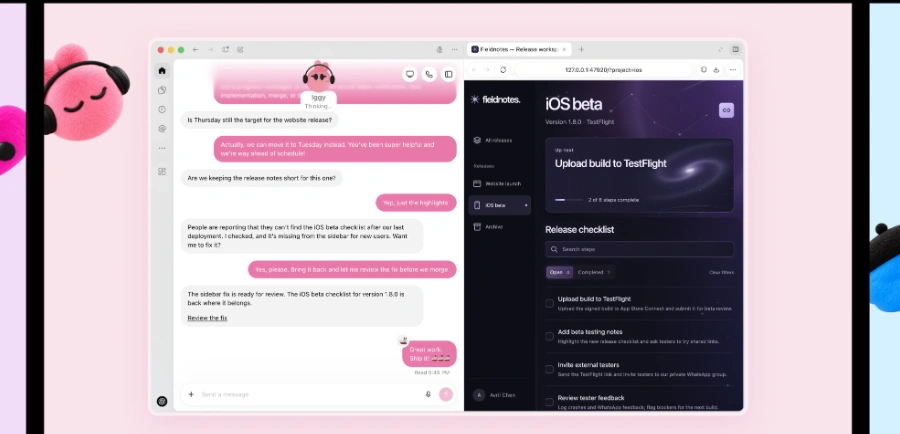
« An AI agent that’s always active, learns from your needs, has its own cloud computer, and connects to more than 4,000 applications to continuously make progress on your tasks (even without supervision) »
Dots: ChatGPT agent mode gives way to always-on personal agents
Updated on September 30, 2026
Dots are OpenAI's always-on personal AI agents, launched at DevDay on September 29, 2026, inside ChatGPT. Each Dot runs on its own cloud computer, is powered by GPT-6 Astra and keeps chasing your goals after the tab closes. The first one comes at no extra charge with Pro and Business Premium plans in eligible markets, though the Pro rollout skips the EEA, Switzerland and the UK. Meta's Muse got a head start of a few weeks, and OpenAI plainly wants the round back.
Pros
Keeps working after you close the chat
Dedicated cloud computer you can inspect anytime
Connects to over 4,000 apps through plugins
Dot conversations excluded from ChatGPT limits
Reachable in Slack and Teams, texting announced
Cons
Pro rollout skips the EEA, Switzerland and UK
Limited to Pro and Business Premium plans
One Dot per person for now
From ChatGPT agent mode to Dots, ownership instead of tasks
A Dot takes ownership of a goal and keeps working on it between your conversations, where agent mode in ChatGPT runs one task and stops. It is the textbook case of a program acting autonomously toward a goal, stretched into round-the-clock operation. OpenAI's launch examples are down to earth. A developer's Dot watches customer feedback and prepares bug fixes, while a scientist's Dot reruns analyses whenever fresh data lands.
Each Dot shows up as a small animated character you name and customize. OpenAI's own showcase features a yellow Dot named Alfred, and one early tester's Dot even spotted a forgotten invoice, prepared it and sent it.
The timing tells its own story. Meta's Muse arrived a few weeks earlier, so autonomous AI agents have become the main front in the race between the big labs.
A DevDay breakdown with Dots front and center
A cloud computer of its own, plus 4,000-plus connected apps
Every Dot gets a dedicated cloud computer with its own browser and reaches over 4,000 apps through OpenAI's plugin catalog. You can open that virtual machine whenever you like and watch the agent at work (oddly soothing during the first days, truth be told).
The conversation follows you around. You message or call your Dot in ChatGPT on web, mobile and desktop, then pick up the same thread in Slack or Microsoft Teams, with texting announced as coming soon.
Aspect
ChatGPT agent mode
A Dot
Duration
One-off task, launched on demand
Ongoing goal, worked 24/7
Machine
Temporary session
Dedicated, inspectable cloud computer
Channels
The chat window
ChatGPT, Slack, Teams, texting soon
Memory
Session context
Learns from your feedback over time
Quotas
Counts against your limits
Dot chats excluded from ChatGPT limits
Setting up your Dot, guardrails included
Setup happens in the ChatGPT desktop app or a desktop browser, on a Pro or Business Premium plan in an eligible market, while Enterprise, Edu and Healthcare workspaces get a beta that stays off until an admin switches it on. Everyone starts with a single agent, and OpenAI plans multiple Dots per person, then teams of them cooperating over time.
Trust is the other half of the pitch. Background research runs read-only, an auto-review step screens consequential actions, and moves such as changing a password stay in human hands. An integration with Microsoft Agent 365 security controls is in development, and tasks handed to Codex or ChatGPT Work still count against those quotas.
Dots are always-on personal AI agents built into ChatGPT and powered by GPT-6 Astra. Each one appears as a small animated avatar, runs on its own cloud computer with a browser, and keeps making progress on your goals after you close the chat, messaging you when a decision is yours to make.
What is the difference between Dots and ChatGPT agent mode?
Agent mode runs a single task launched from the chat and then stops. A Dot holds onto a goal, works in the background on its own machine, learns from your feedback over time, and can carry its own identity and credentials. One follows an order, the other owns a lasting responsibility.
How do you get Dots in ChatGPT?
You create your first Dot from the ChatGPT desktop app or a desktop browser, on a Pro or Business Premium plan in an eligible market. Give it a name, connect your apps, then talk to it in ChatGPT, Slack or Teams. Enterprise, Edu and Healthcare workspaces get a beta that admins must enable.
Are OpenAI Dots agents safe to use?
Several guardrails are active by default. Background research is read-only, an auto-review step checks consequential actions, sensitive moves such as password changes stay with you, and a monitoring system can pause the agent. Caution is still warranted, since OpenAI itself held back GPT-6.1 Astra over safety concerns.
Verdict: Handing over a whole project instead of a single prompt is the habit Dots aim to build. Pro and Business Premium subscribers who already spend their day in ChatGPT, Slack and Teams will feel the difference within a week.
To provide the best experiences, we use technologies such as cookies to store and/or access device information. Consenting to these technologies will allow us to process data such as browsing behavior or unique IDs on this site. Failure to consent or withdrawal of consent may adversely affect certain features and functions.
Functional
Always active
Storage or technical access is strictly necessary for the legitimate purpose of enabling the use of a specific service explicitly requested by the subscriber or Internet user, or for the sole purpose of transmitting a communication over an electronic communications network.
Preferences
Storage or technical access is necessary for the legitimate purpose of storing preferences that are not requested by the subscriber or person using the service.
Statistics
Storage or technical access used exclusively for statistical purposes.Storage or technical access which is used exclusively for anonymous statistical purposes. In the absence of a subpoena, voluntary compliance by your Internet service provider or additional third-party records, information stored or retrieved for this sole purpose generally cannot be used to identify you.
Marketing
Storage or technical access is necessary to create profiles of Internet users in order to send advertisements, or to track the Internet user on a website or on several websites with similar marketing purposes.
To provide the best experiences, we use technologies such as cookies to store and/or access device information. Consenting to these technologies will allow us to process data such as browsing behavior or unique IDs on this site. Failure to consent or withdrawal of consent may adversely affect certain features and functions.
Functional
Always active
Storage or technical access is strictly necessary for the legitimate purpose of enabling the use of a specific service explicitly requested by the subscriber or Internet user, or for the sole purpose of transmitting a communication over an electronic communications network.
Preferences
Storage or technical access is necessary for the legitimate purpose of storing preferences that are not requested by the subscriber or person using the service.
Statistics
Storage or technical access used exclusively for statistical purposes.Storage or technical access which is used exclusively for anonymous statistical purposes. In the absence of a subpoena, voluntary compliance by your Internet service provider or additional third-party records, information stored or retrieved for this sole purpose generally cannot be used to identify you.
Marketing
Storage or technical access is necessary to create profiles of Internet users in order to send advertisements, or to track the Internet user on a website or on several websites with similar marketing purposes.



 Manus AI Agent
  OpenClaw
  Hermes Agent