


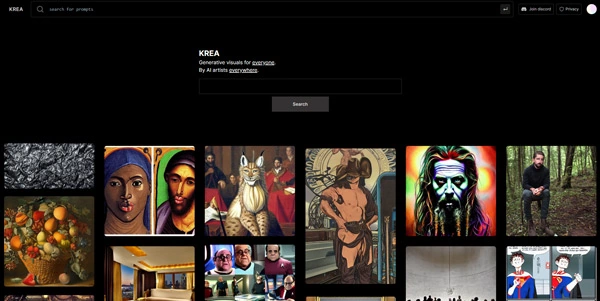
Krea AI: real-time canvas, proprietary models and third-party video generators in a single subscription
Updated on November 15, 2026
Krea AI is a creative AI suite that combines image and video generation, real-time rendering, editing, upscaling and animation inside one web app. The San Francisco company, founded by Victor Perez and Diego Rodriguez, has raised $83M in total (including a $47M Series B led by Bain Capital Ventures in April 2025). According to the publisher, more than 30 million accounts across 191 countries use the platform. A free plan provides 100 compute units per day with no credit card required; paid tiers start at $9/month.
- Real-time canvas renders in under 50 ms, per the publisher
- In-house and third-party models on one billing
- Plugins for Photoshop, Illustrator, Blender, DaVinci Resolve
- LoRA fine-tuning with your own images
- Image upscaling up to 22K, video up to 8K, per the publisher
- Interface and iOS app available in English only
- Compute units drain fast on premium third-party models
- No commercial license on the free plan
Real-time rendering, Krea models and Nodes workflows
Krea AI is built around a real-time canvas: the image updates continuously while you sketch or type a prompt, in under 50 ms according to the publisher. Over twenty tools sit alongside this core feature: image generation, text-to-video and image-to-video (with start and end frames), a canvas editor for adding, removing or extending objects, lipsync, motion transfer, AI voice, text-to-3D and upscaling up to 22K for images. Video generation taps models like Veo, Kling, Seedance, Hailuo, Wan and Runway, all reachable from the same screen.
The company also trains its own models. Krea 2, introduced on May 12, 2026 (Raw and Turbo variants; Turbo produces an image in roughly 2 seconds), had its open weights released on Hugging Face on June 23, 2026. Krea 3, launched on October 15, 2026, is a text-to-image model built for editing: native 2K output, most edits under 8 seconds, up to 6 reference images, per the publisher. It became the app's default model.
Nodes let you chain models into visual workflows, editable collaboratively in real time since October 22, 2026. Krea Agent, a beta feature released in September 2026 for Max and Business subscribers, plans and runs creative tasks from a chat description and also works inside Slack.
Compute units and pricing at a glance
Every generation draws from a pool of compute units, and the cost per image varies sharply by model. A Krea 2 Turbo render costs 2 units, a Krea 1 image 6 units, a Flux image 5, while a Nano Banana Pro generation can reach around 100. On the Basic plan's 5,000 monthly units you can produce plenty of images with the in-house models, but premium third-party models eat through the budget far quicker than you might expect.
- One-off packs from 2,000 to 50,000 units are available, valid 90 days after purchase
- Unused units do not roll over on individual plans
- Krea Agent is included with Max, Business and Enterprise plans
| Plan | Monthly price | Yearly price / mo | Units / month | Commercial license |
|---|---|---|---|---|
| Free | $0 | -- | 100 / day | No |
| Basic | $9 | $5 | 5,000 | Yes |
| Pro | $35 | $21 | 20,000 | Yes |
| Max | from $70 | from $42 | 40,000–100,000 | Yes |
| Business | $200 | $160 | 80,000 | Yes |
Getting started and where Krea AI fits
Krea AI targets designers, architects, marketing teams and game studios. Plugins for Photoshop, Illustrator, After Effects, Premiere Pro, DaVinci Resolve and Blender let you generate assets without leaving your production tool. An iOS app (rated 4.5/5 on the US App Store) syncs projects with the web version; there is no Android app yet. The site is in English, but prompts work in any language and the documentation exists in French.
Compared with Midjourney, Leonardo AI or Magnific, Krea AI differentiates itself through its real-time canvas and the aggregation of image and video generators under a single subscription. Pricing changes from time to time, so it is worth checking krea.ai/pricing for the latest figures.
Frequently asked questions
What is Krea AI?
Krea AI is a creative AI suite for generating, editing, enhancing and animating images and videos. One subscription gives access to proprietary models (Krea 1, 2, 3) and dozens of third-party models for image and video. Based in San Francisco, the company reports over 30 million accounts across 191 countries.
How to use Krea AI?
Sign up for free on krea.ai (100 compute units a day, no credit card). Pick a tool (Image, Video, Realtime, Edit, Enhancer), choose a model, and write a prompt. The platform runs in the browser, on iOS and through plugins for Photoshop, Blender and several other applications. Each generation draws a variable number of compute units depending on the model.
Is Krea AI free?
Yes, there is a free plan with 100 compute units per day and no credit card required. It includes the real-time canvas and limited upscaling, but no commercial license. Paid plans start at $9/month (Basic) or $5/month on annual billing, with a commercial license on every paid tier. Unused units do not roll over on individual plans.
What is Krea 2 and how does it differ from Krea 3?
Krea 2 is the company's own text-to-image model, announced on May 12, 2026, with Raw and Turbo variants and open weights published on Hugging Face on June 23, 2026. It supports LoRA fine-tuning. Krea 3, released on October 15, 2026, is an image editing model: native 2K output, most edits under 8 seconds, up to 6 reference images. Krea 3 is now the default model in the app.
Verdict: Sketching a rough shape and watching the photorealistic result appear in under a second, then editing, animating and upscaling it without switching tools: Krea AI is aimed at designers, architects and marketing teams who want dozens of image and video models under a single subscription. Prompts work in any language, even though the interface stays in English.
 More sites like Krea.ai in the category: #Image Generators
Text generated by AI



 Copy Link
« An all-in-one creative platform that brings together more than 30 image and video models in a single interface. It includes camera controls that let you direct like a real filmmaker, characters that remain consistent from scene to scene, and ready-to-use tools for ads and short-form content »
 90