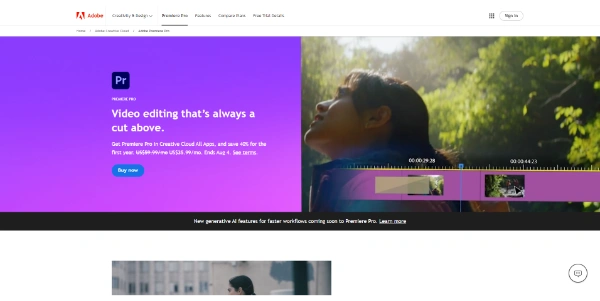
« Professional video editing software with powerful AI features: AI video generation, smart transitions, voice enhancement, automatic subtitling, colorimetry and more »
Adobe Premiere Pro: automatic masking, AI-extended clips and a shorter name
Updated on September 15, 2026
Adobe Premiere Pro is Adobe's professional video editing software, the timeline of choice for studios, YouTube channels and agencies since 2003. With version 26 the app now goes by plain Premiere and ships with automatic object masking, generative extend and built-in transcription. A subscription runs $22.99 per month on an annual plan, after a 7-day free trial. Captions, transcription and the interface itself work in many languages.
Pros
Object masking with automatic subject tracking
Built-in transcription and caption generation
Direct handoff to After Effects, Photoshop and Audition
Generative extend to stretch a clip that ends too soon
Runs natively on Apple Silicon and Windows ARM
Cons
Subscription only, no perpetual license
Heavy projects call for serious hardware
Steep learning curve for a first edit
Object Mask, Generative Extend and captions, the AI toolkit inside Premiere
The Object Mask tool detects people and objects in a shot, then tracks them automatically with no keyframes. You hover over a face in the program monitor, the mask draws itself and sticks to the subject until the end of the shot, handy for blurring, regrading or relighting an area without hours of manual rotoscoping.
The rest of the kit works in the same spirit. A clip cut too short gets extended, a poorly recorded voice gets cleaned up, a horizontal video gets reframed for vertical formats. Everything happens on the timeline, without leaving the app.
AI feature
What it does on the timeline
Object Mask
Isolates a subject and tracks it through the whole shot
Generative Extend
Stretches a clip by 2 seconds of video, 10 of audio
Auto Reframe
Recrops to vertical or square while keeping the subject framed
Speech to Text
Transcribes dialogue and generates captions
Enhance Speech
Cleans up rough voice recordings
Scene Edit Detection
Finds the cuts in already-edited footage
A close look at Object Mask in version 26
Masking and tracking a moving subject in Premiere
Version 26 retires the Pro suffix and rebuilds the engine
Released in January 2026, version 26 dropped the word Pro from the official name, with Adobe now talking simply about Premiere. The software itself remains the same full editor, only faster, with shape mask tracking up to 20 times quicker than in version 25.
Firefly now generates B-roll and sound effects straight from the timeline, a sign that Adobe's AI software is moving in tight formation. Among the other highlights of this generation, four deserve a mention.
Over 90 GPU-accelerated effects and transitions
Native support for Windows ARM machines
Color Mode, a color grading workspace rebuilt for editors (in beta)
A Sequence Index panel for navigating endless timelines
Premiere pricing, from the single app to full Creative Cloud
The single app costs $22.99 per month on an annual plan, $34.99 month to month, or $263.88 prepaid for the year. Creative Cloud Pro, billed at $69.99 monthly, adds After Effects, Photoshop and the rest of the suite (more useful than you might think the day an animated title enters the picture). These figures shift with Adobe's promotions, so the official plans page is the only source worth trusting.
Against it, DaVinci Resolve plays the lifetime license card and Final Cut Pro the one-time purchase on Mac. Premiere keeps the Adobe ecosystem, its highly rated clip editing and a steady flow of updates on its side.
No, Premiere is subscription only, starting at $22.99 per month on an annual plan, after a 7-day free trial. There is no perpetual license. Students and teachers get a heavily discounted Creative Cloud education plan that includes the entire Adobe suite, not only Premiere.
Premiere Pro or DaVinci Resolve?
DaVinci Resolve banks on a free version and a one-time Studio license, while Premiere works by subscription. On G2 reviews, Premiere scores higher than Resolve for clip editing and captions, and its native handoff to After Effects remains a strong argument for effects-heavy projects.
Why did Adobe drop the Pro from Premiere Pro?
The suffix disappeared with version 26 to simplify the brand across the desktop app, the iPhone edition and connected services like Frame.io. Nothing changes in the installed software, which remains the full editor updated through Creative Cloud, and the Premiere Pro name is still widely used across the web.
What hardware does Premiere require?
An Apple Silicon Mac or a recent PC will do, and version 26 even runs natively on Windows ARM. Object masking downloads its AI models on first launch and, on Intel Macs or older AMD graphics cards, automatically falls back to a lighter detection model while remaining fully usable.
Verdict: More than twenty years at the top of professional editing bays, and the update pace has not slowed. Working editors, YouTube filmmakers and marketing teams already living inside Creative Cloud will find their daily workhorse here.
To provide the best experiences, we use technologies such as cookies to store and/or access device information. Consenting to these technologies will allow us to process data such as browsing behavior or unique IDs on this site. Failure to consent or withdrawal of consent may adversely affect certain features and functions.
Functional
Always active
Storage or technical access is strictly necessary for the legitimate purpose of enabling the use of a specific service explicitly requested by the subscriber or Internet user, or for the sole purpose of transmitting a communication over an electronic communications network.
Preferences
Storage or technical access is necessary for the legitimate purpose of storing preferences that are not requested by the subscriber or person using the service.
Statistics
Storage or technical access used exclusively for statistical purposes.Storage or technical access which is used exclusively for anonymous statistical purposes. In the absence of a subpoena, voluntary compliance by your Internet service provider or additional third-party records, information stored or retrieved for this sole purpose generally cannot be used to identify you.
Marketing
Storage or technical access is necessary to create profiles of Internet users in order to send advertisements, or to track the Internet user on a website or on several websites with similar marketing purposes.
To provide the best experiences, we use technologies such as cookies to store and/or access device information. Consenting to these technologies will allow us to process data such as browsing behavior or unique IDs on this site. Failure to consent or withdrawal of consent may adversely affect certain features and functions.
Functional
Always active
Storage or technical access is strictly necessary for the legitimate purpose of enabling the use of a specific service explicitly requested by the subscriber or Internet user, or for the sole purpose of transmitting a communication over an electronic communications network.
Preferences
Storage or technical access is necessary for the legitimate purpose of storing preferences that are not requested by the subscriber or person using the service.
Statistics
Storage or technical access used exclusively for statistical purposes.Storage or technical access which is used exclusively for anonymous statistical purposes. In the absence of a subpoena, voluntary compliance by your Internet service provider or additional third-party records, information stored or retrieved for this sole purpose generally cannot be used to identify you.
Marketing
Storage or technical access is necessary to create profiles of Internet users in order to send advertisements, or to track the Internet user on a website or on several websites with similar marketing purposes.



 Gemini Omni
  HeyGen AI
  CapCut