
Gradio
#92 in Developer Tools
« Create and share machine learning (ML)-based applications with an intuitive, easy-to-understand tool »
Similar AI Tools
 GPT-5.3-Codex
  Claude Code
  Cursor AI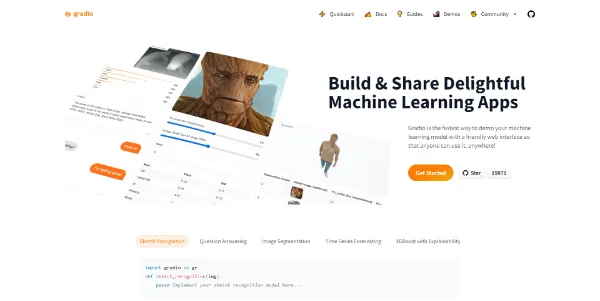


Updated on October 14, 2026
Gradio is a free, open-source Python library (Apache 2.0) that wraps any Python function or machine learning model into a shareable web interface, with zero JavaScript or CSS required. Abubakar Abid started the project at Stanford in 2019, and Hugging Face acquired it in December 2021. The repository has crossed 43,500 stars on GitHub. Its latest stable release, 6.30.0, landed on October 8, 2026.
Getting started takes one command, pip install --upgrade gradio, and Python 3.10 or later (Python 3.14 support was added in the 6.0 series). You write a function, pass it to gr.Interface with input and output types, call demo.launch(), and the app opens in your browser. That really is the whole setup.
Sharing is just as direct. Adding share=True generates a temporary public URL (valid for roughly one week) that routes traffic to your local machine. For permanent hosting, Hugging Face Spaces runs Gradio projects on free CPU Basic hardware, while GPU options like the T4 small cost $0.40/h. The ZeroGPU tier grants a few free GPU minutes per day on eligible accounts.
Beyond gr.Interface, gr.Blocks gives full control over layout with rows, columns, tabs and accordions. gr.ChatInterface builds a complete chatbot with streaming and history in under ten lines. The vibe mode, triggered with gradio --vibe app.py, opens an in-browser chat to edit the app in plain language (it complements the gradio sketch command, which is still available in version 6).
Every Gradio app automatically exposes an OpenAPI-compliant REST endpoint. Adding mcp_server=True to launch() goes further by turning each function into an MCP tool that AI agents like Claude Desktop or Cursor can call through the Model Context Protocol. Docstrings and type hints serve as the tool description, no extra schema needed.
The gradio_client Python package and @gradio/client npm package let other programs query a Gradio app programmatically, skipping the browser entirely. Thousands of public Gradio demos are hosted on Hugging Face Spaces, covering image classification, text generation, audio transcription and 3D visualization. Platforms like Replicate AI or Google AI Studio take different approaches to machine learning model testing, but Gradio remains the go-to option for rapid Python prototyping.
| Class | Typical use case | Lines of code |
|---|---|---|
| gr.Interface | Simple input/output demo | 3 to 5 |
| gr.Blocks | Custom layout with tabs and columns | 10 to 30 |
| gr.ChatInterface | Chatbot with history and token streaming | 5 to 10 |
| gr.TabbedInterface | Multiple demos under one roof | 8 to 15 |
The most common installation error is ModuleNotFoundError: no module named 'gradio'. It almost always means pip installed the package in a different virtual environment than the one running the script. Activate the correct venv, run pip install --upgrade gradio, and the error disappears.
Gradio 6.0.0, released on November 21, 2025, brought breaking changes including the removal of tuple-format chat messages and the relocation of theme, css and js parameters into launch(). If you maintain an app written for version 4, the official migration guide walks through every change step by step. Hugging Face Spaces pricing may shift over time, so check the official Hugging Face pricing page for the latest figures.
Gradio is a free, open-source Python library maintained by Hugging Face. It lets you turn any Python function or ML model into an interactive web app in a few lines of code, with no front-end skills required. The project was created in 2019 at Stanford and acquired by Hugging Face in late 2021.
A Gradio app is a Python script that uses gr.Interface, gr.Blocks, or gr.ChatInterface to expose a function through a web page. To deploy, push it to Hugging Face Spaces (free on CPU Basic), or run demo.launch(share=True) for a temporary public link routed to your local machine. No container or web server configuration is needed.
Neither is universally better. Gradio shines for single-model demos with native ML components (image, audio, 3D) and instant sharing via share=True. Streamlit, acquired by Snowflake, is stronger for multi-page dashboards and data exploration apps. Both are free and Apache 2.0 licensed, but they target different workflows.
Run pip install --upgrade gradio inside an active virtual environment with Python 3.10 or later. For MCP server support, add the extra with pip install 'gradio[mcp]'. If you hit ModuleNotFoundError: no module named 'gradio', double-check that you are running the script in the same venv where pip installed the package.
Verdict: From a bare Python function to a live, shareable demo without writing a single line of front-end code: that sums up the Gradio experience. ML researchers, data scientists and backend developers who want fast prototyping within the Hugging Face ecosystem will feel right at home.

« An all-in-one creative platform that brings together more than 30 image and video models in a single interface. It includes camera controls that let you direct like a real filmmaker, characters that remain consistent from scene to scene, and ready-to-use tools for ads and short-form content »



