
GPTExcel
#1 in Files & Spreadsheets
« Improve how you work with your Excel and Google Sheet files with AI. Generate complex formulas, automation scripts, SQL queries and more »

Verified Tool
Similar AI Tools
 Unstuck AI
  Acrobat AI by Adobe
  ChatPDF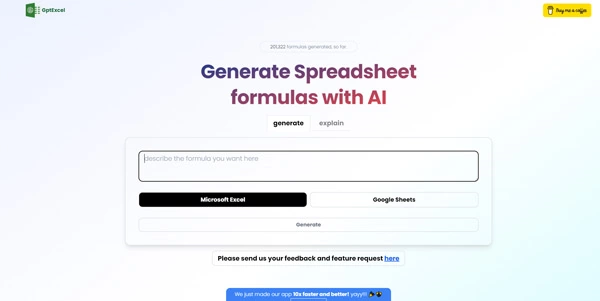


Updated on October 13, 2026
GPTExcel is an AI spreadsheet assistant that turns plain-English descriptions into ready-to-paste formulas for Excel, Google Sheets, LibreOffice Calc and Airtable. The publisher reports 1.6 million accounts and over 60 million formulas generated to date. A free tier ships with 50 credits per month, no credit card required, while the Pro plan costs $9 per month and Pro Plus $18 per month.
GPTExcel runs entirely in the browser. Type a goal like "total revenue by region where quarter equals Q2" and the tool returns the matching SUMIFS or XLOOKUP formula for your chosen platform, along with a step-by-step explanation. It cross-checks against Microsoft's and Google's official function documentation before answering, so a function that only exists in Insider or Beta builds comes with a warning first.
The chat also accepts uploaded files (.xlsx, .xls, .xlsm, CSV/TSV) and photographs of printed tables (PNG, JPG, WebP). From there you can ask for a pivot table, a chart, a data cleanup, or a summary. Finished files download as Excel workbooks, PowerPoint decks or PDFs.
On the scripting side, GPTExcel writes the macro language built into Office since 1993, Apps Script, LibreOffice Basic, Airtable scripts, Python code, SQL queries and regular expressions, each with a plain-language explanation.
The spreadsheet-AI space has grown considerably. Microsoft 365 Copilot edits the open workbook in place, Numerous.ai lets you drag an =AI() function down a column, and Excel Formula Bot pairs formula generation with file analysis tools. GPT for Work focuses on bulk column processing with multiple model choices.
GPTExcel covers more ground than a formula-only helper, bundling file chat, pivot tables, charts, slide decks and reports into one browser tab at a lower price point than Copilot. The trade-off is clear, though. There is no add-in living inside your spreadsheet, so every formula must be copied back manually.
| Feature | Free ($0) | Pro ($9/mo) | Pro Plus ($18/mo) |
|---|---|---|---|
| Monthly credits | 50 | ≈ 3,000 | ≈ 10,000 |
| Max file size | 5 MB | 50 MB | 100 MB |
| Files per conversation | 10 | 20 | 30 |
| Available models | Fast | Fast + Standard | Fast + Standard + Expert |
Sign up with a Google or Microsoft account, or request a passwordless magic link. No local install, no Excel add-in, no Sheets extension. Formulas and scripts are copied into your spreadsheet, and generated files (Excel, PowerPoint, PDF) download directly.
Uploaded files are encrypted in transit and at rest according to the publisher, remain private unless explicitly shared, and are never fed into model training. Deleting the account permanently removes all chats and files. Payments go through LemonSqueezy, so the GPTExcel team never sees card details. Pricing and credit allowances may change over time, so the official site remains the definitive reference.
GPTExcel is a strong pick when budget matters and the task is formula generation, scripting or file analysis from a browser. Microsoft 365 Copilot works directly inside Excel for in-place editing, Numerous.ai suits repeated row-level tasks, and Excel Formula Bot pairs formulas with data analysis. The right choice depends on the workbook job.
The free plan includes 50 monthly credits, five daily tool runs, and file uploads up to 5 MB with no credit card. The $9 Pro plan raises credits to roughly 3,000 per month, file size to 50 MB, and adds a Standard model alongside the Fast one. Pro Plus at $18 unlocks an Expert model and about 10,000 credits.
GPTExcel's chat accepts .xlsx, .xls, .xlsm, CSV and TSV uploads. You ask questions in plain English and the tool returns summaries, pivot tables, charts, trend analysis or cleaned data. The free tier caps file size at 5 MB. For analysis that stays inside the spreadsheet without exporting, Copilot or GPT for Work are alternatives worth comparing.
Open gptexcel.uk in any browser, sign in, and describe the formula or analysis you want. GPTExcel returns the formula or script, which you paste back into your workbook. No add-in, no extension, no desktop app. Microsoft's own Copilot, by contrast, requires a Microsoft 365 subscription and runs as a sidebar inside Excel.
Verdict: For accountants, analysts or students who want formula help, file analysis and scripted automation from a single browser tab without installing anything, GPTExcel delivers a wide feature set at a price that starts at zero.

« An all-in-one creative platform that brings together more than 30 image and video models in a single interface. It includes camera controls that let you direct like a real filmmaker, characters that remain consistent from scene to scene, and ready-to-use tools for ads and short-form content »



