


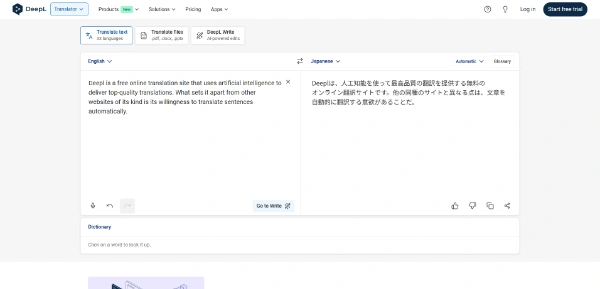

- Exceptional nuance and idiom interpretation
- Enterprise-grade privacy compliant with EU standards
- High-fidelity real-time voice translation
- Preserves complex document formatting perfectly
- Premium pricing model
- Struggles with niche dialects and modern slang
DeepL: 2026 review of the AI translator (Voice, Write, privacy)
DeepL has saved our bacon countless times. (You know that feeling when you accidentally insult a client’s grandmother in Spanish because you trusted a subpar translator?) We do. For this reason, we stopped messing around with generic tools. We switched to the heavy artillery.
Most people still view online translation as that robotic mess from ten years ago. However, times have changed. DeepL goes beyond swapping words. Instead, the software interprets intent, tone, and cultural nuance better than some human interpreters we know.
➥ What is DeepL? (And Why You Should Care)
DeepL operates as an AI-powered communication platform. Originally, the tool started as a simple translator, but today the system has become a full-blown linguistic ecosystem. The engine uses a proprietary Large Language Model (LLM) specifically tuned for language. Consequently, the AI focuses on communication rather than writing Python code or poetry like GPT-5.
A company based in Europe
The company calls Cologne, Germany, home. This location matters because the team is obsessed with data privacy and EU standards. While Silicon Valley giants want to train their models on your confidential emails, DeepL deletes your data immediately after processing. Effectively, the tool acts as a secure layer between you and the rest of the planet.
➥ Main Features: Beyond Simple Text

We tested the latest updates recently. Here is what this beast can actually do.
1. DeepL Voice (The “Babel Fish” is Real)
We finally have it. DeepL Voice launched fully this year, and the performance is wild. You can hold your phone up during a conversation. Instantly, the app translates spoken dialogue in real-time. Surprisingly, the AI handles speed, interruptions, and even mumbling well.
For remote teams, “DeepL Voice for Meetings” integrates with Zoom and Teams. The software generates live subtitles in your language while your colleague speaks theirs. No more awkward nodding when you have no idea what the French marketing director just said.
2. DeepL Write Pro: Style Surgery
This feature fixes your bad writing. The tool catches deeper issues than typos; the AI restructures entire sentences. You paste a clunky email, select “Diplomatic” or “Executive” tone, and the system polishes the text until the words shine.
We use this constantly to sound smarter than we actually are. The function works for English, German, French, and Spanish. It feels like having a strict editor hovering over your shoulder, but without the judgment.
3. The Customization Hub
Generic AI makes mistakes with brand names. Fortunately, DeepL lets you fix this. You create “Glossaries” that force the AI to translate specific terms precisely how you want. If your product is named “CloudWalker,” the system won’t translate the label to “Sky Pedestrian” in German. Therefore, your brand voice remains consistent across all documents.
4. Document Translation That Actually Works
Drag a PDF, Word doc, or PowerPoint into the window. DeepL translates the text but keeps every image, font, and margin perfectly in place. We threw a complex legal PDF at the engine, and the output looked identical to the original. This capability saves hours of reformatting.
5. DeepL Agent
The latest addition to the family, this autonomous agent handles repetitive tasks. It automates translation workflows without you having to lift a finger. Handy for teams that manage international customer support.
➥ How to Use DeepL?
You have four main ways to access this brainpower. We recommend installing the desktop app immediately.
- The Web Interface: Good for quick copy-paste jobs. No installation required.
- The Desktop App (Mac/Windows): The best experience. You select text in any app (email, Slack, Word) and hit a shortcut (Ctrl+C+C). Suddenly, a small window pops up with the translation. The process feels like magic.
- Browser Extensions: DeepL sits in your Chrome or Edge browser. Consequently, the tool translates emails as you write them in Gmail.
- The Mobile App: Essential for travel. This is where the Voice feature shines.
➥ Advantages and Concrete Benefits
Why choose this over the free stuff built into your phone? Here is our honest take.
The Good Stuff (Pros)
- Nuance King: The AI understands idioms. The system knows that “it’s raining cats and dogs” doesn’t involve actual animals falling from the sky.
- Privacy First: The Pro version guarantees your data never hits their training servers. For business, this protection is non-negotiable.
- Speed: The new infrastructure is incredibly fast. Even large files process in seconds.
- Voice Quality: The new real-time voice translation sounds less robotic than competitors.
The Not-So-Good Stuff (Cons)
- The Price Tag: Quality costs money. The service is higher priced than “free”.
- Language Count: The platform supports fewer languages (~100) than Google (~130+). If you require Swahili or Lao, you might be out of luck.
- Slang Limits: The model still struggles with very specific Gen Z slang or extremely local dialects.
➥ Pricing Model
DeepL keeps the structure simple with a tiered model. (Note: Prices fluctuate, but this is the general setup).
- DeepL Free: Great for casual use. However, limits exist on text length and file size. Your data is utilized to train their models.
- DeepL Pro Starter: Removes data tracking. You get unlimited text translation. Plus, the plan includes 5 document translations per month.
- DeepL Pro Advanced: The sweet spot for professionals. Included are more documents and integration into CAT tools (for translators).
- DeepL Pro Ultimate: Designed for big teams requiring massive volume.
➥ Who is This Tool Best For?
We don’t recommend this for everyone. If you just want to order a beer in Cancun, use a free app. Instead, DeepL suits:
- International Business Teams: You cannot afford miscommunication in contracts or emails.
- Developers: The API is robust. In fact, the code powers half the multilingual apps on the market.
- Writers & Marketers: DeepL Write is a killer tool for perfecting copy in multiple languages.
- Expats: Dealing with foreign bureaucracy requires the precision that only DeepL provides.
➥ Top 3 Alternatives to DeepL
Maybe DeepL isn’t your vibe. Here are the other heavy hitters right now.
1. Google Translate (Gemini Powered)
Google has upgraded its old translator with the Gemini engine. The service is excellent for obscure languages where DeepL has zero coverage. However, the interface remains a bit clunky. Also, if you care about privacy, well… the provider is Google.
2. ChatGPT / Claude
You can ask an LLM to “translate this and make it sound funny.” These bots are more inventive than DeepL. Yet, the models often hallucinate (make things up) and destroy document formatting. Use them for fiction, not legal docs.
3. Grammarly
If you only care about English writing, Grammarly is still the heavyweight champion. But DeepL Write is catching up fast. Furthermore, Grammarly cannot translate your text into French afterward.
➥ Comparison: DeepL vs. The Giants
We made this table to help you decide quickly.
| Feature | DeepL Pro | Google Translate | ChatGPT (GPT-5) |
|---|---|---|---|
| Translation Nuance | ⭐⭐⭐⭐⭐ (Best) | ⭐⭐⭐ | ⭐⭐⭐⭐ |
| Data Privacy | ⭐⭐⭐⭐⭐ (SOC2) | ⭐⭐ | ⭐⭐⭐ |
| Document Formatting | ⭐⭐⭐⭐⭐ (Perfect) | ⭐⭐⭐ (Often breaks) | ⭐ (Text only) |
| Language Support | ~100 Languages | 130+ Languages | All known languages |
| Creative Control | ⭐⭐⭐ | ⭐ | ⭐⭐⭐⭐⭐ |
➥ Conclusion & Review
DeepL remains the undisputed king of accuracy. While other tools try to do everything (images, code, poetry), this platform focuses on one thing: perfect communication. The addition of DeepL Voice and the upgrades to the Write tool have turned the software into a complete productivity suite.
If you work internationally, you are essentially flying blind without the app. The free version is generous enough to get you hooked. But if you value your privacy and professional reputation, the upgrade is a no-brainer.
Stop guessing what that email means. Why not go test the tool out for yourself?
 Try DeepL
 ➥ Questions Fréquentes (FAQ)
Is DeepL free to use?
Yes, DeepL offers a free version for basic text and document translation. However, this free tier enforces daily character limits and restricts file security features. For unlimited translation volume and advanced data privacy, users must upgrade to a paid DeepL Pro subscription.
How does DeepL Voice function during meetings?
DeepL Voice integrates with video platforms to provide real-time translation of spoken dialogue. The tool generates live subtitles in your preferred language as colleagues speak, allowing DeepL users to follow multilingual conversations instantly without needing human interpreters.
What does DeepL Write do for text improvement?
DeepL Write acts as an AI-powered editing assistant rather than a content generator. DeepL analyzes your draft to suggest improvements in grammar, tone, and style, helping you restructure sentences to sound more professional or diplomatic in supported languages.
Is DeepL better than Google Translate?
Many users find DeepL superior for capturing linguistic nuance and cultural context, especially in European languages. While Google Translate supports significantly more languages, DeepL utilizes a specialized AI architecture that prioritizes natural phrasing and accuracy over raw language quantity.
Is my data safe when using DeepL?
DeepL adheres to strict EU data protection standards and GDPR regulations. Unlike the free version, the DeepL Pro service guarantees that all texts are deleted immediately after processing and are never used to train the DeepL AI models.
What are the primary limitations of DeepL?
The main limitation of DeepL is its smaller language library compared to generalist competitors. DeepL currently supports over 100 languages, meaning it may not be suitable for translating niche dialects or less common languages that other tools might cover.
 More sites like Deepl in the category: #Translation
Text written by a human



 Copy Link
« An all-in-one creative platform that brings together more than 30 image and video models in a single interface. It includes camera controls that let you direct like a real filmmaker, characters that remain consistent from scene to scene, and ready-to-use tools for ads and short-form content »
 90
90


