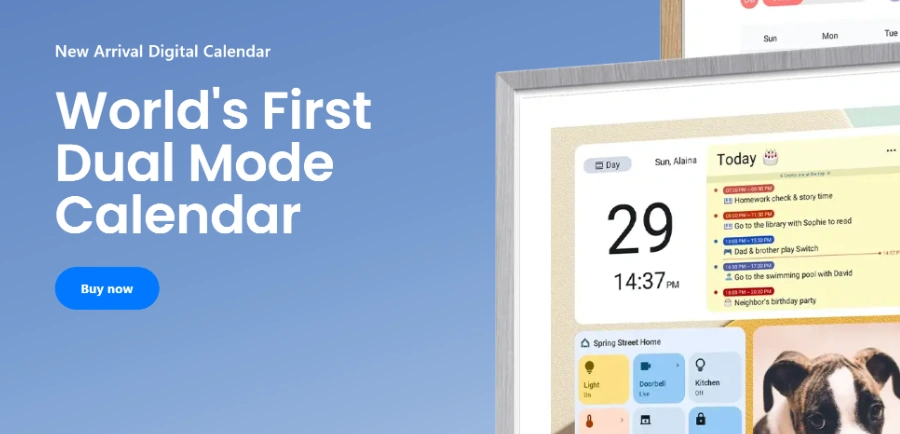
« Organize the whole family’s schedules, tasks, and routines on a shared digital calendar that can also serve as a customizable dashboard. The lineup includes several screen sizes as well as a mobile app to keep schedules in sync »
Apolosign: two operating modes on one family wall calendar, paid for once
Updated on September 18, 2026
Apolosign is a factory-direct brand of smart home displays, best known for its dual-mode digital family calendar alongside portable TVs and photo frames. Founded in 2008, it ships around 2 million units a year and counts over one million households. Nothing recurring to pay, the dual-mode calendar launched from $299 with chores, rewards and photo screensaver built in. Screen sizes run from 15.6 inches up to a 27-inch 4K panel.
Pros
No subscription, every feature included for life
Two-way sync with Google and iCloud calendars
Android mode with Google Play apps and widgets
Chore tracking with points and rewards for kids
Three sizes, up to a 27-inch 4K panel
Cons
Interface built for the US market first
European buyers report an app-store region switch at setup
Always plugged in, so plan a wall outlet
Apolosign's dual mode, a focused planner on one side, Android on the other
The Apolosign digital calendar runs two separate environments on a single touchscreen. Calendar Mode gathers shared schedules, chores, weekly meals and shopping lists, while Android Mode opens a widget dashboard and lets you install apps from Google Play.
Sync works both ways with Google Calendar and iCloud, and covers Outlook or Yahoo through the CalDAV protocol. You add an appointment from the Apolosign mobile app, and it lands on the kitchen wall seconds later. Four built-in microphones handle voice assistants, handy when your hands are covered in flour.
Widgets can pull in the video doorbell, weather or home cameras, and every family member arranges the screen their own way.
An honest verdict on the 21.5-inch calendar after real home use
The 15.6-inch wall planner reviewed feature by feature
Three screen sizes and chores that earn points
Every completed task earns kids points they can trade for rewards set by the parents. The chore chart stops being a magnet-pinned sheet on the fridge and becomes a scoreboard everyone glances at in passing.
Skylight, Hearth Display and Cozyla play in the same category, and phone-based productivity apps are everywhere. Apolosign's pitch fits on one line, zero recurring fees.
Screen size
Best spot
15.6 inches
Small space, hallway or home office
21.5 inches
Kitchen, household of two to three people
27 inches (Full HD or 4K)
Large open-plan room, bigger family
Apolosign pricing, warranty and where to buy
The dual-mode line launched at $299, and the brand lists its 27-inch model at $599 in Full HD or $799 in 4K. Skylight's 15-inch device sells for $299.99 with a $79-a-year Plus plan on top for part of its features. Promotions move these numbers around, so check the official store before ordering.
Orders come with free US shipping, 30-day returns and a year of free repair. Units also sell on Amazon and Walmart, sometimes below list price.
Does the Apolosign calendar require a subscription?
No, every feature is included in the hardware price. Calendar sync, chores, rewards, to-do lists and the photo screensaver stay free for life, and software updates cost nothing. That sets it apart from Skylight, which places part of its feature set behind a yearly Plus plan.
Is apolosign.com legit?
Yes, by most available signals. The brand has operated since 2008, holds a 4.8 out of 5 rating on Trustpilot, and backs orders with 30-day returns plus a one-year repair service. Some automated site checkers suggest standard online-shopping caution, though no serious issue has been documented.
Apolosign or Skylight, which one should you pick?
Skylight has the longest track record and a very polished mobile app, at $299.99 plus $79 a year for its Plus plan. Apolosign bundles chores, rewards and the photo screensaver at no recurring cost, and adds an open Android side with Google Play that Skylight does not match.
Can you install third-party apps on the Apolosign calendar?
Yes. Android Mode gives full access to Google Play, so streaming, recipe or music apps install like on a tablet. One buyer even watches Netflix while cooking on the 21.5-inch model. The brand's portable TVs run Android too and accept the same apps.
Verdict: One payment covers everything, a rarity in this product category. Busy households juggling Google, Apple and Outlook calendars will get the most from this wall-mounted planner, with a quick app-store tweak for buyers outside the US.
To provide the best experiences, we use technologies such as cookies to store and/or access device information. Consenting to these technologies will allow us to process data such as browsing behavior or unique IDs on this site. Failure to consent or withdrawal of consent may adversely affect certain features and functions.
Functional
Always active
Storage or technical access is strictly necessary for the legitimate purpose of enabling the use of a specific service explicitly requested by the subscriber or Internet user, or for the sole purpose of transmitting a communication over an electronic communications network.
Preferences
Storage or technical access is necessary for the legitimate purpose of storing preferences that are not requested by the subscriber or person using the service.
Statistics
Storage or technical access used exclusively for statistical purposes.Storage or technical access which is used exclusively for anonymous statistical purposes. In the absence of a subpoena, voluntary compliance by your Internet service provider or additional third-party records, information stored or retrieved for this sole purpose generally cannot be used to identify you.
Marketing
Storage or technical access is necessary to create profiles of Internet users in order to send advertisements, or to track the Internet user on a website or on several websites with similar marketing purposes.
To provide the best experiences, we use technologies such as cookies to store and/or access device information. Consenting to these technologies will allow us to process data such as browsing behavior or unique IDs on this site. Failure to consent or withdrawal of consent may adversely affect certain features and functions.
Functional
Always active
Storage or technical access is strictly necessary for the legitimate purpose of enabling the use of a specific service explicitly requested by the subscriber or Internet user, or for the sole purpose of transmitting a communication over an electronic communications network.
Preferences
Storage or technical access is necessary for the legitimate purpose of storing preferences that are not requested by the subscriber or person using the service.
Statistics
Storage or technical access used exclusively for statistical purposes.Storage or technical access which is used exclusively for anonymous statistical purposes. In the absence of a subpoena, voluntary compliance by your Internet service provider or additional third-party records, information stored or retrieved for this sole purpose generally cannot be used to identify you.
Marketing
Storage or technical access is necessary to create profiles of Internet users in order to send advertisements, or to track the Internet user on a website or on several websites with similar marketing purposes.



 Chessnut
  Tesla Optimus
  NEO by 1x Technologies