
LM Studio
#188 in LLM models
« Run language models (LLMs) easily on your device, without an Internet connection. Preserve your confidentiality and secure your data »
Similar AI Tools
 Claude Opus 5.5
  GPT-6 Astra
  Claude Fable 5.1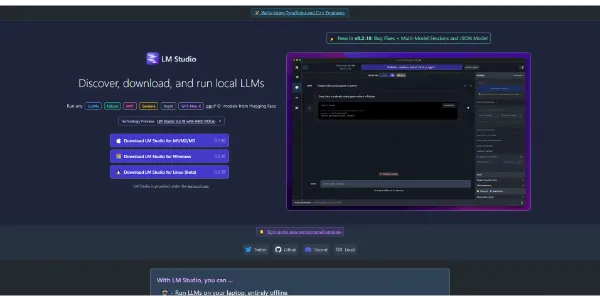


Updated on September 7, 2026
LM Studio is a free desktop application that downloads and runs large language models directly on your computer, so nothing you type ever reaches the cloud. Llama, Mistral, Qwen or Gemma come straight from Hugging Face and keep answering offline. Element Labs launched it back in May 2023 and later scrapped the old commercial license, which means the app now costs nothing at home or at work. It runs on Windows, Apple Silicon Macs and Linux.
LM Studio shows the file size, quantization level and estimated memory footprint of every model before you hit download. You search for Mistral or Qwen in the built-in catalog, grab the file, and a chat window opens that also accepts your PDFs and Word documents (keep some disk space handy, several models weigh over 10 GB).
RAM is the real gatekeeper here. A laptop with 8 GB already handles a small model, and 16 GB makes a 7B or 8B feel comfortable. With hundreds of references to pick from, a look at current LLM model rankings saves a lot of trial and error.
| Available memory | Models that fit | Typical use |
|---|---|---|
| 8 GB RAM | Llama 3.2 3B, small Gemma or Phi builds | Summaries, quick questions |
| 16 GB RAM | Mistral 7B, Qwen 8B, up to 13B | Smooth chat, code, documents |
| 32 GB RAM | Mistral Small 24B, Qwen3-Coder 30B | Agents, tool calling |
| Mac with 48 GB+ unified | 70B-class models | Long contexts, near-cloud quality |
LM Studio and Ollama run the same open-source models at very similar speeds, so the choice comes down to how you like to work. One puts every setting in a visual desktop app, while Ollama lives in the terminal, ships its code under an MIT license and stays lighter for servers and Docker containers.
Between the two sits Jan.ai, a graphical app that is also open source. Nothing stops you from keeping LM Studio for comfortable chat and Ollama for scripts, they coexist without any conflict.
A single switch in the developer tab turns the machine into a local server compatible with the OpenAI and Anthropic API formats. That Anthropic-style endpoint lets you point Claude Code at your local models, and any tool speaking the OpenAI format connects too, backed by Python and JavaScript SDKs plus a CLI called lms.
On the plugin side, LM Studio supports MCP servers to hook a model up to web search or your own tooling, though adding one still means editing an mcp.json file by hand. As for the bill, there is none. The app is free for everyone, and only the Teams and Enterprise offers, with SSO and control over approved models, are priced on request. Since everything stays on your computer, confidential material never touches a third party.
Yes, LM Studio is completely free, for personal projects and for work alike. The company removed the commercial license requirement that appeared in its original terms. Only the Teams and Enterprise offers, which add SSO and team-level control over approved models, are priced on request. No account is required to install or run the app.
It hinges on how you feel about the terminal. LM Studio gives you a full graphical interface, while Ollama is command-line driven, open source and lighter for servers or Docker. Performance is close since both rely on the llama.cpp engine. Plenty of people simply keep both installed for different jobs.
Plan on 16 GB of RAM for comfort, though 8 GB handles small models. On Mac, only Apple Silicon is supported, with macOS 14 or newer. Windows machines require an AVX2 processor, and LM Studio Linux ships as an AppImage. A GPU speeds things up considerably but is optional.
Once a model is downloaded, yes, everything runs offline. Conversations, attached documents and voice input stay on the machine, which settles privacy and compliance questions for sensitive material on the spot. The connection is only used to fetch the app, the models and updates.
Verdict: Developers wiring local models into Claude Code, freelancers handling confidential client files and the merely curious all get the same deal here, a capable AI that answers on their own hardware with no subscription and no token meter. The shortest route into local AI without ever opening a terminal.

« An all-in-one creative platform that brings together more than 30 image and video models in a single interface. It includes camera controls that let you direct like a real filmmaker, characters that remain consistent from scene to scene, and ready-to-use tools for ads and short-form content »



